This article appeared in digital photography school.
Now I am going to have to try this!
https://digital-photography-school.com/night-photography-without-tripod-photoshop-help/

This article appeared in digital photography school.
Now I am going to have to try this!
https://digital-photography-school.com/night-photography-without-tripod-photoshop-help/
From time to time, I have to figure out why the Trove CI failed some job. By “from to time”, I really mean “constantly”, “all the time”, and “everyday”.
Very often the issue is some broken change that someone pushed up, easy ones are pep8 or pylint failures, slightly harder are the py27/py35 failures. The really hard ones are failures in the Trove scenario tests.
Very often the failures are transient and a recheck fixes them (which is annoying in itself) but sometimes the failure is repeatable.
In the past week, I’ve had to deal with one such issue; I first realized that it was a repeated failure after about a dozen rechecks of various changes.
I realized that the change had a telltale signature that looked like this:
Test Replication Instance Multi-Promote functionality.
Test promoting a replica to replica source (master).        SKIP: Failure in <function wait_for_delete_non_affinity_master at 0x7f1aafd53320>
Verify data is still on new master.                         SKIP: Failure in <function wait_for_delete_non_affinity_master at 0x7f1aafd53320>
Add data to new master to verify replication.               SKIP: Failure in <function wait_for_delete_non_affinity_master at 0x7f1aafd53320>
Verify data exists on new master.                           SKIP: Failure in <function wait_for_delete_non_affinity_master at 0x7f1aafd53320>
The important part of the message (I realized later) was the part that read:
Failure in <function wait_for_delete_non_affinity_master ...
Looking a bit above this, I found the test that had in fact failed
Wait for the non-affinity master to delete. FAIL
One thing important in this kind of debugging is to try and figure out when this failure really started to happen, and that’s one of the places where logstash comes in really handy.
For every single CI job run by the OpenStack integrated gate, the result artifacts are parsed and some of them are indexed in an elasticsearch database.
It is trivial now to pick up the string that I felt was the ‘signature’ and search for it in logstash. Within seconds I can tell that this error began to occur on 4/11.

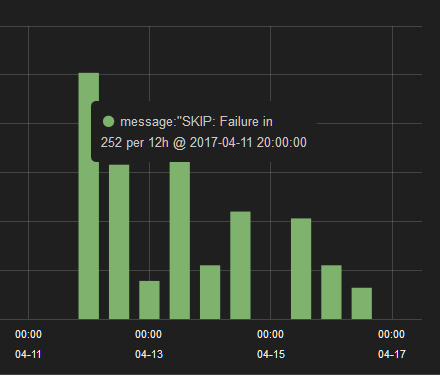 This, by itself was not sufficient to figure out what the problem was, but once Matt Riedemann identified a probable cause, I was able to confirm that the problem started occurring shortly after that change merged.
Logstash is a really really powerful tool, give it a shot, you’ll find it very useful.
The Raspberry Pi 3 that I have comes standard with two network interfaces; a wired interface that can do 100mbps and a WiFi interface. Older Raspberry Pi’s required that you use a USB dongle for WiFi, I don’t use those units any longer.
So for the purposes of all that follows, I assume Raspberry Pi 3, onboard WiFi and wired ethernet.
By default, these two interfaces are active and software that you run on the Raspberry Pi can connect to the outside world using one, or both.
I’ve found several interesting use-cases for the Raspberry Pi by changing the way these interfaces are configured.
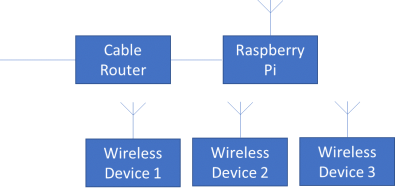
 In this image, three devices (device 1, 2 and 3) are not WiFi enabled and are internet connected using the Raspberry Pi as effectively a wireless network extender.
This setup is relatively straightforward on a Raspberry Pi.
With this setup, the three devices connected to the wired interface will get their DHCP leases from the Raspberry Pi. Packets will get forwarded by the Raspberry Pi between the wired and wireless interfaces.
 The above configuration is very useful for some things but not always. I have a printer (quite old) which I have connected to a single parallel port ethernet print server (TP-Link TL-PS110P). I need to be able to access this printer from other wirelessly connected devices and so I need it to have its DHCP lease coming from the WiFi Access Point!
This setup is similar to (1) above, but no dnsmasq, no NAT, enable proxy ARP.
 This is something I’ve just been playing with recently and it appears to work quite well. The Raspberry Pi 3’s WiFi interface can be configured to act as an access point using the hostapd package. The way I have this setup, dnsmasq is enabled and the wirelessly connected devices receive DHCP leases from the Raspberry Pi. Traffic is routed to the internet over the wired interface.
Eventually, this is what I want to get, a Raspberry Pi as a secure WiFi access point; the WiFi interface running in access point mode but all traffic going out of the wired interface is tunneled to a VPN.
I use OpenVPN, and that works fine on the Raspberry Pi already. Have to put the pieces together and make it a bit more robust; right now, not quite there.
Equally interesting would be the other configuration like (1) above but where all traffic out of the WiFi interface is tunneled. In that setup, I could, for example connect my laptop to the wired interface and connect to any WiFi access point on the Raspberry Pi. Traffic over the WiFi interface would be tunneled by the Raspberry Pi and this would be an ideal travel setup as the Raspberry Pi would just be powered off the USB port on the laptop 🙂
I have been using a Raspberry Pi (I’ve bought a few of these on Amazon, at $50 each, they are a bargain) for some time now and have found them to be excellent for a number of things.
A recent project to set one up as a WiFi access point got me thinking that I should, maybe, share some of these use-cases.
So, here’s a primer on how I setup the Raspberry Pi. I have a new one on order right now so this is an actual first-time setup.
If you have never done this before, don’t worry, it is very simple.
New and out of the box, the only things that you have to do are
I don’t purchase the “complete kit” which comes with a Micro-SD card. I usually have a card or three hanging around and set it up using NOOBS (That’s Raspberry Pi’s New Out Of Box Software).
Since I setup the card on a Windows machine, there is one thing I’d like to highlight. The documentation makes it sound hard, they have you download some special format utility and all that stuff. Don’t bother.
Just follow the easy instructions found here.

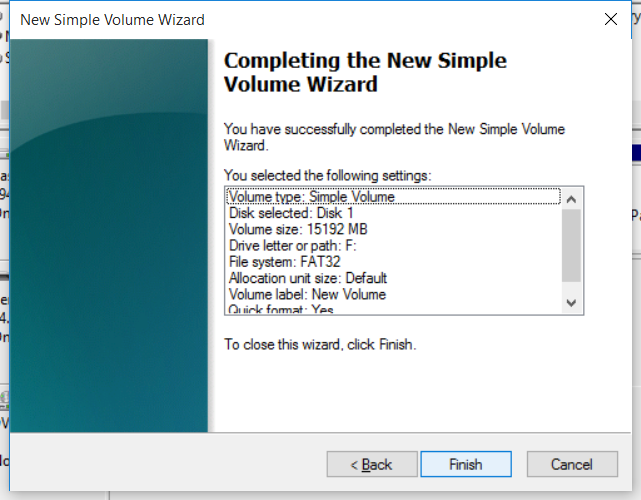
My new 16GB disk drive is the one that shows up as Disk 1.
This was a brand new SD card, if you are reusing an SD card, you may see multiple partitions, delete them all.
If you find that the “Delete Volume” options are greyed out, you will have to use the Windows Command Line. Use the diskp art utility, select the disk, then select each partition in turn and delete it. You will be left with a disk that looks like this.
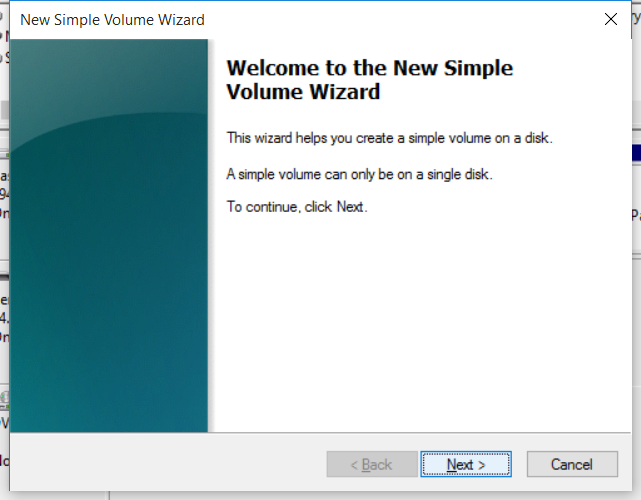
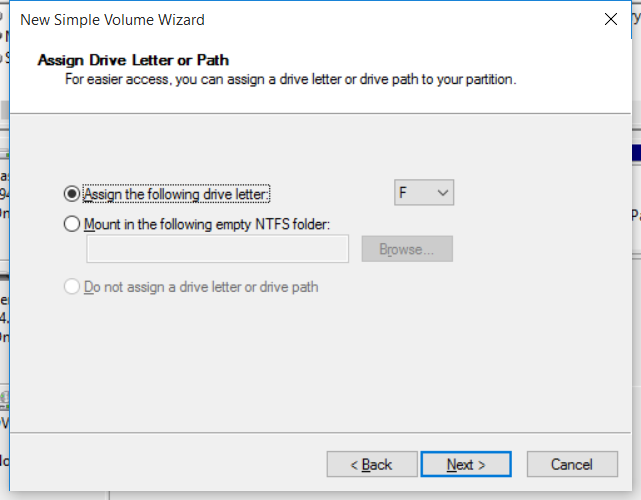
Observe that now Disk 1 is shown as “Unallocated”. I always make sure I get here and format the disk.
 |
 |
 |
 |
 |
 |
That’s really all there is to your first time Raspberry Pi setup!
Two of the most important things I’ve learned to work with in the past couple of weeks are the Curves Tool in Photoshop (for post processing) and the Histogram tool (either in Photoshop or on your camera itself, for use either while taking pictures, or in post processing).
This article is about the curves tool, well worth the read.
-amrith
After you’ve mastered Levels , it’s time to take a step up to the tool that is probably the most useful for color and contrast control in Photoshop: Curves. As with levels, you should play around with the basic Curves command to get a feel for it.
Which type of lens is better, a prime lens or a zoom lens? This is one of the most debatable topics in photography. Some of you might choose a zoom lens and others may choose a prime lens, it all depends on what and where you are going to shoot.
Source: Primes Versus Zoom Lenses: Which Lens to Use and Why?
I’ve been following the blockchain ecosystem for some time now largely because it strikes me as yet another distributed database architecture, and I dream about those things.
For some time now, I’ve been wondering what to do after Tesora and blockchain was one of the things I’ve been looking at as a promising technology but I wasn’t seeing it. Of late I’ve been asking people who claim to be devotees at the altar of blockchain what they see as the killer app. All I hear are a large number of low rumbling sounds.
And then I saw this article by Jamie Burke of Convergence.vc and I feel better that I’m not the only one who feels that this emperor is in need of a wardrobe.
Let’s be clear, I absolutely agree that bitcoin is a wonderful use of the blockchain technology and it solves the issue of trust very cleverly through proof of work. I think there is little dispute of elegance of this solution.
But once we go past bitcoin, the applications largely sound and feel like my stomach after eating gas station sushi; they sound horrible and throw me into convulsions of pain.
In his article, Jamie Burke talks of 3d printing based on a blockchain sharded CAD file. I definitely don’t see how blockchain can prevent the double-spend (i.e. buy one Yoda CAD file, print 10,000).
Most of the blockchain ideas I’m seeing are things which are attempting to piggy-back on the hot new buzzword and where blockchain is being used to refer to “secure and encrypted database”. After all, there’s a bunch of crypto involved and there’s data stored there right? so it must be a secure encrypted database.
To which I say, Bullshit!
P.S. Oh, the irony. This blog post references a blog post with a picture labeled “Burke’s Bullshit Cycle”, and the name of this blog is hypecycles.com.
A very long time ago, and on a planet very unlike the earth we are on now, Thierry sent this email [1] proposing that after Barcelona, let’s split the OpenStack Summit into what have now come to be known as the Design Summit and a Forum. The email thread that resulted from [1] was an active one and had 125 responses, along the way Thierry also posted [2], a summary of the issues and concerns raised.
I had my reservations about the idea, and now, after returning from the first of these, have had some time to reflect on the result.
On the whole, the event was very well done, and I believe that everyone who attended the feedback session had positive things to say about the event, and my congratulations to Erin Disney and the rest of the team at the Foundation. The attendance was a solid 500 to 600 people (I don’t know the exact number) and Thierry must be psychic because he predicted almost exactly that in February [3].
 I did not realize that the foundation had gone as far as to get Starbucks to customize a blend of coffee for us, and to get the Sheraton to distribute in our rooms (image courtesy of Masayuki Igawa, @masayukig).
The format gave attendees the opportunity to get a significant amount of work done both within their own project teams, as well as with other project teams, without the interruptions and distractions of the summit.
I particularly liked the fact that I could attend two days of cross project sessions and then two and a half days of sessions with other projects. By giving projects two or three room-days instead of four or five room-hours dramatically improved the amount of time that projects could focus on their own discussions, and spend on cross project discussions.
Personally, I think the PTG was a success, and seems to have delivered most if not all of the things that it set out to do. Some things outside of our control, certainly outside the control of the foundation have cast a small shadow on the proceedings and we need to seriously consider the consequences of where the next summit and PTG’s are. The location has implication for many attendees, and I think we should seriously consider having remote participation at future events.
From my recollection of the feedback session (unfortunately I don’t have a link to the etherpad, if someone has it, please post a comment with it) everyone had good things to say about the event as a whole. The consensus was that the food was good but cold sandwiches get boring after day 3, the air handlers were noisy, the rooms were too cold (or hot), the chairs were uncomfortable, and there was no soda. That feedback is consistent with organizing an event for 500 people in a hotel or convention facility anywhere in the world. And if that’s all that people could put down in the “needs improvement” section, the event was a huge success.
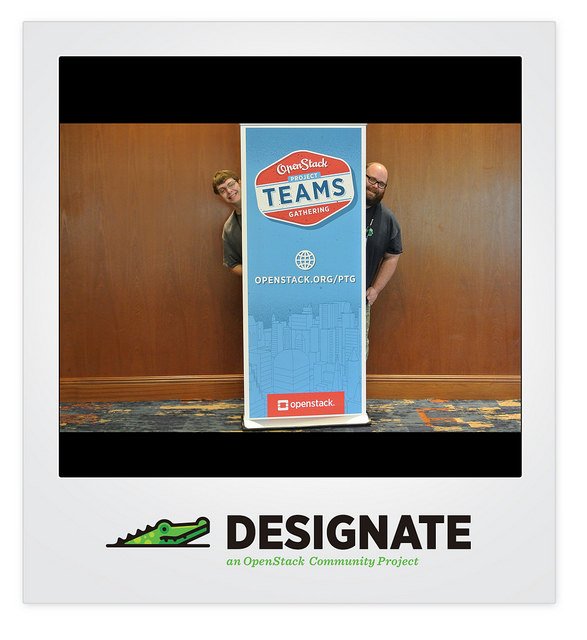 I think the award for the best picture at the summit (thanks to Thierry for the tweet) goes to the Designate team[4]. I should’ve thought to get a Trove team photo while we were there!
[1] http://markmail.org/thread/v6h3qzs7rb35h6fo
[2] http://markmail.org/message/slzcvunoxccse5k4
[3] http://markmail.org/message/bultywgyxued5khl
[4] https://twitter.com/tcarrez/status/835149239571316736/photo/1
Yesterday it was announced that Tesora had been acquired by Stratoscale, here are some of the articles that were published about this.
and this official announcement by Stratoscale
Thanks to all of you who emailed, texted, tweeted, called, and pinged me on IRC 🙂 I’m overwhelmed by the volume and all the good wishes. I’ll reply to each of you individually, sorry it may take a couple of days for me to do that.
To all of our investors and advisors, first in ParElastic and later in Tesora, thank you all for your help and support. To everyone at Tesora who is moving to Stratoscale, all the very best to you. It has truly been a wonderful six years working with you and I thoroughly enjoyed it.
Doug: It’s been especially awesome working with you these past six years. You are a great leader of people, and you have built and managed a truly exceptional team. People in your team like you, respect you, are comfortable approaching you with the strangest questions, and are willing to work with you over and over again. Not an easy thing to pull off over the extraordinarily long period that you’ve been able to do this. You were clearly not an easy taskmaster and your team consistently delivered miracles. But along the way you managed to ensure that everyone was having a good time.
Ken: No entrepreneur can have hoped for a better partner than you. It has been an extraordinary ride and it has been truly my honor and privilege to have taken this ride along with you. I think you were instrumental in building a company which was a very special place to work, where we built some excellent technology, got some marquee customers, and had a lot of fun doing it. I’ve learned a lot, about startups, about technology, about business, and about myself; thank you very much for this awesome experience.
Several of you have asked me “what’s next for Amrith”. I don’t know yet, I’m trying to figure that out (thanks to all of you who have offered to help me figure this out, I will certainly take you up on that).
In the short term, I’m going to continue to work on Trove, finish up my term as the PTL for Ocata and continue to work on the project as we begin the Pike cycle.
What comes later, I have no idea but if you have ideas, I’m all ears.
I purchased an Acurite 10 sensor indoor humidity and temperature monitoring system and am surprisingly happy with it. I was expecting a generally crappy experience but I have to say I was wrong, and it wasn’t that I’d set my expectations so low; the system is truly quite good.
The system I purchased is this one.
You get a smartHub and 10 sensors. Pictured below is the hub and a sensor.


The smartHub comes with a little power adapter and an ethernet cable. Stick it into a wall outlet and connect the ethernet cable to your router and DHCP does its thing and the smartHub gets online.
It initiates a series of accesses to some locations and downloads firmware and the like. (I’ve captured network traces, if I find anything interesting, I’ll blog about that). In a couple of minutes the lights stabilize and you have to press a button that says “Activate”.
Then you create an online account at the Acruite site and once you are logged in, you associate your account with the device. You identify it by the number on the bottom (spoiler alert, the number is the MAC address of the device).
Within about a minute, the device shows up and you are good to go for the next step.
Each sensor takes two AAA batteries, pop them in and within a minute the web portal shows a new device which you can rename and mount wherever you want it. Very slick and easy.
Within about 15 minutes I had 10 sensors online and reporting.
I was so happy with this that I’ve purchased another smartHub and 10 more indoor/outdoor sensors; they don’t have the LCD display.
OK, so what did I not like?
Acurite strikes me as a company that makes fine hardware and they appear to have done an absolutely bang up job on the initial setup and “getting started” part of the experience.
They are not a software company. The software part of the “after setup” experience is kind of horrible.
They offer no easy API based mechanism to retrieve your sensor data. Yes, on the web app, you can click a couple of buttons and play with date controls and get a link to some AWS S3 bucket mailed to you with your data as a CSV but really, advertise an API, get someone to write an IFTTT channel, then you’ll be cooking with gas.
Next post will be a deconstruction of the protocol, what you get when you point your web browser at the smartHub’s IP address, and those kinds of fun things.
The people at Acurite Support are wonderful. I have (in the past three days) spoken with two of them, and interacted with one via email. The people I spoke with were knowledgeable, and very helpful.
The wait times on hold are quite bad. I waited 25 minutes and 15 minutes respectively on hold. There is the usual boring elevator music while you stay in line with an announcement every minute that you are “XX in line”. No indication of how long your wait will be but you are offered the option of getting a callback.
An odd thing though is that while I was in line and I heard the message “you are second in line” a couple of times, I suddenly ended up being “third in line”. How someone got ahead of me in line, I know not.
But, their support is great. 5 stars for that!
Every OpenStack developer has to interact with the gerrit code review system. Reviewers and core reviewers have to do this even more, and PTL’s do a lot of this.
The web-based interface is not conducive to many of the more common things that one has to do while managing a project and early on, I started using the gerrit query CLI.
Along the way, I started writing a simple CLI that I could use to automate more things and recently a few people asked about these tools and whether I’d share.
I’m not claiming that this is unique, or that this hasn’t been done before; it evolved slowly and there may be a better set of tools out there that does all of this (and more). I don’t know about them. If you have similar tools, please do share (comment below).
So, I’ve cleaned up this tools a bit (removed things like my private key, username and password) and made them available here.
Full disclosure, they are kind of rough at the edges and you could cause yourself some grief if you aren’t quite sure what you are doing.
Here’s a quick introduction
It should be nothing more than cloning the repository git@github.com/amrith/gerrit-cli and running the install command. Note, I use python 2.7 as my default python on Ubuntu 16.04. If you use python 3.x, your mileage may vary.
The simplest command is ‘ls’ to list reviews
gerrit-cli ls owner:self
As you can see, the search here is a standard gerrit query search.
You don’t have to type complex queries everytime, you can store and reuse queries. A very simple configuration file is used for this (a sample configuration file is also provided and gets installed by default).
amrith@amrith-work:~$ cat .gerrit-cli/gerrit-cli.json
{
    # global options
    "host": "review.openstack.org",
    "port": 29418,

    # "dry-run": true,

    # user defined queries
    "queries": {
        # each query is necessarily a list, even if it is a single string
        "trove-filter": ["(project:openstack/trove-specs OR project:openstack/trove OR project:openstack/trove-dashboard OR project:openstack/python-troveclient OR project:openstack/trove-integration)"],

        # the simple filter uses the trove-filter and appends status:open and is therefore a list

        "simple": ["trove-filter", "status:open"],

        "review-list": ["trove-filter", "status:open", "NOT label:Code-Review>=-2,self"],

        "commitids": ["simple"],

        "older-than-two-weeks": ["simple", "age:2w"]
    },

    # user defined results
    "results": {
        # each result is necessarily a list, even if it is a single column
        "default": ["number:r", "project:l", "owner:l", "subject:l:80", "state", "age:r"],
        "simple": ["number:r", "project:l", "owner:l", "subject:l:80", "state", "age:r"],
        "commitids": [ "number:r", "subject:l:60", "owner:l", "commitid:l", "patchset:r" ],
        "review-list": [ "number:r", "project:l", "branch:c", "subject:l:80", "owner:l", "state", "age:r" ]
    }
}
The file is a simple JSON and you can comment lines just as you would in python (#…)
The best way to see what’s going on is to use the –dry-run command (or to be sure, uncomment the line in your configuration file).
amrith@amrith-work:~$ gerrit-cli --dry-run ls owner:self
ssh review.openstack.org -p 29418 gerrit query --format=JSON --current-patch-set --patch-sets --all-approvals owner:self
+--------+---------+-------+---------+-------+-----+
| Number | Project | Owner | Subject | State | Age |
+--------+---------+-------+---------+-------+-----+
[...]
+--------+---------+-------+---------+-------+-----+
So the owner:self query makes a gerrit query and formats and displays the output as shown above.
So, what columns are displayed? The configuration contains a section called “results” and a default result is defined there.
"default": ["number:r", "project:l", "owner:l", "subject:l:80", "state", "age:r"],
You can override the default and cause a different set of columns to be shown. If a default is not found, the code has a hardcoded default as well.
Similarly, you could run the query:
amrith@amrith-work:~$ gerrit-cli --dry-run ls
ssh review.openstack.org -p 29418 gerrit query --format=JSON --current-patch-set --patch-sets --all-approvals owner:self status:open
+--------+---------+-------+---------+-------+-----+
| Number | Project | Owner | Subject | State | Age |
+--------+---------+-------+---------+-------+-----+
+--------+---------+-------+---------+-------+-----+
and a default query will be generated for you, that query is owner:self and status:open.
You can nest these definitions as shown in the default configuration.
amrith@amrith-work:~$ gerrit-cli --dry-run ls commitids
ssh review.openstack.org -p 29418 gerrit query --format=JSON --current-patch-set --patch-sets --all-approvals (project:openstack/trove-specs OR project:openstack/trove OR project:openstack/trove-dashboard OR project:openstack/python-troveclient OR project:openstack/trove-integration) status:open
+--------+---------+-------+---------+-------+-----+
| Number | Project | Owner | Subject | State | Age |
+--------+---------+-------+---------+-------+-----+
+--------+---------+-------+---------+-------+-----+
The query “commitids” is expanded as follows.
commitids -> simplesimple -> trove-filter, statusopentrove-filter -> (...)
You can do a lot more than just list reviews …
amrith@amrith-work:~$ gerrit-cli --help
usage: gerrit [-h] [--host HOST] [--port PORT] [--dry-run]
              [--config-file CONFIG_FILE] [-v]
              {ls,show,update,abandon,restore,recheck} ...

A simple gerrit command line interface

positional arguments:
  {ls,show,update,abandon,restore,recheck}
    ls                  list reviews
    show                show review(s)
    update              update review(s)
    abandon             abandon review(s)
    restore             restore review(s)
    recheck             abandon review(s)

optional arguments:
  -h, --help            show this help message and exit
  --host HOST           The gerrit host. Default: review.openstack.org
  --port PORT           The gerrit port. Default: 29418
  --dry-run             Whether or not to actually execute commands that
                        modify a review.
  --config-file CONFIG_FILE
                        The path to the gerrit-cli configuration file to use
                        for this session. (Default: ~/.gerrit-cli/gerrit-
                        cli.json
  -v, --verbose         Provide additional (verbose) debug output.
Other things that I do quite often (and like to automate) are update, abandon, restore and recheck.
A word of caution: when you aren’t sure what the command will do, use –dry-run. Otherwise, you could end up in a world of hurt.
Like, when you accidentally abandon a 100 reviews 🙂
And even if you know what your query should do, remember I’ve hidden some choice bugs in the code. You may hit those too.
Enjoy!
I’ll update the readme with more information when I get some time.
There are numerous blogs and resources for the new and aspiring OpenStack contributor, providing tips, listing what to do. Here are seven things to avoid if you want to be an effective OpenStack contributor.
I wrote one of these.
There have been presentations at summits that share other useful newbie tips as well, here is one.
Project repositories often include a CONTRIBUTING.rst file that shares information for newcomers. Here is the file for the Trove project.
Finally, many of these resources include a pointer to the OpenStack Developer’s Guide.
Over the past three years, I have seen several newbie mistakes repeated over and over again and in thinking about some recent incidents, I think the community has not done a good job documenting these “Don’t Do’s”.
So here is a start; here are seven things you shouldn’t do, if you want to be an effective OpenStack contributor.
 The commit message is a useful part of the commit and it serves to inform reviewers about what the change is, and how your proposed fix addresses the problem. In general, (with the notable exception of procedural commits for things like releases or infrastructure), the commit message should not be empty. The words “Trivial Fix” do not suffice.
OpenStack documents best practices for commit messages. Make sure your commit message provides a succinct description of the problem, describes how you propose to fix it, and includes a reference (via the Close-Bug, Partial-Bug or Related-Bug tags) to the Launchpad entry for the issue you are fixing.
In OpenStack, reviewing changes is a community activity. If you propose changes, they get merged because others in the community contribute their time and effort in reviewing your changes. This wouldn’t work unless everyone participates in the review process.
Just because you submitted some changes, don’t expect others to feel motivated or obligated to review your changes. In many projects, review bandwidth is at a premium and therefore you will have a better chance getting your change reviewed and approved if you reciprocate and review other people’s changes.
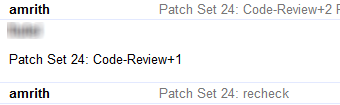 When you review someone’s code, merely adding a +1 serves no useful purpose. At the very least indicate what you did with the change. Equally useful is to say what you did not do.
For example, you could indicate that you only reviewed the code and did not actually test it out. Or you could go further and download and test the patch set and indicate in your review comment that you tested the change and found it to work. On occasion, such as when I review a change for the first time, I will indicate that I have reviewed the changes but not the tests.
Feel free to ask questions about the change if you don’t follow what is being done. Also, feel free to suggest alternate implementations if you feel that the proposed implementation is not the best one for some reason(s).
Don’t feel shy about marking changes with a -1 if you feel that it is not ready to merge for some reason.
A drive-by +1 is a generally unhelpful activity, and if you persist at doing that, others in the community will tend to discount your reviews anyway.
 By far, the most egregious violation that I’ve seen is when people blatantly try to game the Stackalytics system. Stackalytics is a tool that tracks individual and company participation in OpenStack.
Here, for example, is the Stackalytics page for the Trove project in the current release:
Reviews: http://stackalytics.com/?module=trove-group
Commits: http://stackalytics.com/?module=trove-group&metric=commits
It allows you to see many metrics in a graphical way, and allows you to slice and dice the data in a number of interesting ways.
New contributors, bubbling with enthusiasm often fall into the trap of trying to game the system and rack up reviews or commits. This can end up very badly for you if you go down this route. For example, recently one very enthusiastic person showed up with a change that got blasted out to about 150 projects, and attempted to add a CONTRIBUTING.rst file to all of these projects. What ensued is documented in this mailing list thread:
A few of the changes were merged before they were reverted, the vast majority were abandoned.
Changes like this serve no real useful purpose. They also consume an inordinate amount of resources in the CI system. I computed that the little shenanigan described above generated approximately 1050 CI jobs and consumed about 190 hours of time on the CI system.
I admit that numbers are important and they are a good indication of participation. But quality is a much more important metric because quality is an indicator of contribution. And I firmly believe that participation is about showing up, contribution is about what you do once you are here, and contribution is a way more important thing to aim for than participation.
Finally, when you’ve submitted a change, and people review and provide comments, don’t ignore them. If you are serious about a change, you will stay with it till it gets merged. Respond to comments in a timely manner, if only to say that you will come back with a new patch set in some time.
If you don’t, remember that review bandwidth is a scarce resource and in the future your changes may get scant attention from reviewers. Others who review your changes are taking time out of their schedules to participate in the community. At the very least you should recognize and respect that investment on their part and reciprocate with timely responses.
And above all, if you aren’t sure how to proceed, don’t be shy. Post a question on the mailing list if you aren’t sure what to do about something. If that’s too public for you (and that’s perfectly alright), ask the question on the IRC channel for the project in question. If that is too public, find someone who is active on the project (start with the PTL) and send that person an email.
An important aspect of the role of a PTL is fielding those questions, and all of us (PTL’s) receive several of these questions each month. Not sure whom to ask, then toss the question out on IRC at #openstack or #openstack-dev and you should receive an answer before long.
 An important thing to remember about IRC is that it is an asynchronous medium. So, don’t expect answers in real time. The OpenStack community is highly distributed, but also most active during daylight hours, Monday to Friday in US time. If you pop up on IRC, ask a question and then disappear, you may not get your answer. If you can’t stick around for a long time on IRC, then post your question to the mailing list.
But better still, there are many ways in which you can connect to IRC and leave the connection up (so you can read the scrollback), or find some other mechanism to review the scrollback (like eavesdrop.openstack.org) to see if your question was answered.
If you have your own pet peeve, please share it in the comments section. I hope this will become a useful resource for aspiring OpenStack contributors.
Since my first OpenStack Summit in Atlanta (mid 2014), I have been to a number of OpenStack-related events, meetups, and summits. And at every one of these events, as well as numerous customer and prospect meetings, I’ve been asked some variant of the question:
Isn’t Trove insecure because the guestagent has RabbitMQ credentials?
A bug was entered in 2015 with the ominous (and factually inaccurate) description that reads “Guestagent config leaks rabbit password”.
And while I’ve tried to explain to people that this is not at all the case, this misconception has persisted.
At the Summit in Barcelona, I was asked yet again about this and I realized that obviously, whatever we in the Trove team had been doing to communicate the reality was insufficient. So, in preparation for the upcoming Summit in Boston, I’m writing this post as a handy resource.
Shown here is a simplified representation of a Trove system with a single guest database instance. The control plane components (Trove API, Trove Task Manager, and Trove Conductor) and the Guest Agent communicate via oslo.messaging which is typically implemented with some messaging transport like RabbitMQ.
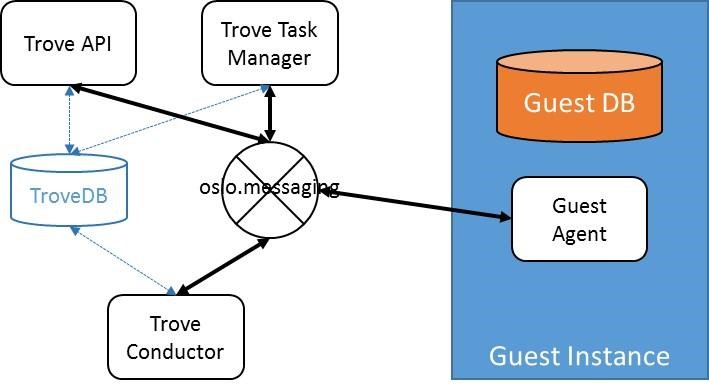 To connect to the underlying transport, each of these four components needs to store credentials; for RabbitMQ this is a username and password.
The contention is that if a guest instance is somehow compromised (and there are many ways to do this) and a bad actor gains access to the RabbitMQ credentials, then the OpenStack deployment is compromised.
Here are some reasons this is not really an issue on a properly configured production system.
All of this notwithstanding, the urban legend was that Trove was a security risk. The reason invariably involved a system configured by devstack, with a single RabbitMQ, open access to port 22 on the guest, run in the same tenant as the requestor of the database.
Yet, one can safely say that no one in their right mind would operate OpenStack as configured by devstack in production. And certainly, with Trove, one would not use the development images whose elements are part of the source tree in a production deployment.
In the Ocata release, one additional set of changes has been made to further secure the system. All RPC calls on the oslo.messaging bus are completely encrypted. Furthermore, different conversations are encrypted using unique encryption keys.
 The messaging traffic on oslo.messaging is solely for oslo_messaging.rpc, the OpenStack Remote Procedure Call mechanism. The API service makes calls into the Task Manager, the Task Manager makes calls into the Guest Agent, and the Guest Agent makes calls into the Conductor.
The picture above shows these different conversations, and the encryption keys used on each. When the API service makes an RPC call to the Task Manager, all parameters to the call are encrypted using K1 which is stored securely on the control plane.
Unique encryption keys are created for each guest instance, and these keys are used for all communication. When the Task Manager wishes to make a call to Guest Agent 1, it uses the instance specific key K2, and when it wants to make a call to Guest Agent 2, it uses the instance specific key K3. When the guest agents want to make calls to the Conductor, the traffic is encrypted using the instance specific keys and the conductor decrypts the parameters using those instance specific keys.
In a well configured production deployment, one that takes steps to secure the system, if a bad actor were to compromise a guest instance (say Guest Agent 1) and get access to K2 and the RabbitMQ Credentials, the user could access RabbitMQ but would not be able to do anything to impact either another guest instance (he wouldn’t have K3) or the Task Manager (he wouldn’t have K1).
Code that implements this capability is currently in upstream review.
This blog post resulted in a brief twitter exchange with Adam Young (@admiyoung)
@amrithkumar broker provides encryption.
What oslomsg needs is authentication and authorization: https://t.co/U110mZNtUR— Adam Young (@admiyoung) January 9, 2017
@admiyoung agreed, been there, and couldn’t get that; hence this implementation is all that’s left … https://t.co/uOS6CTnrxl
— amrith (@amrithkumar) January 9, 2017
@amrithkumar You should be able to get there for Trove, though: Separate user, domain etc. No?
— Adam Young (@admiyoung) January 9, 2017
Unfortunately, a single user (in RabbitMQ) for Trove isn’t the answer. Should a guest get compromised, then those credentials are sufficient to post messages to RabbitMQ and cause some amount of damage.
One would need per guest instance credentials to avoid this; or one of the many other solutions (like shadow tenants, etc).
Amazon’s demented plans for its warehouse blimp with drone fleet http://arstechnica.com/information-technology/2016/12/amazons-demented-plans-for-its-warehouse-blimp-with-drone-fleet/?amp=1
Shit like this is what gives patents a bad name!
President Signs Law Protecting Your Right to Review https://www.eff.org/deeplinks/2016/12/president-signs-law-protecting-right-review
I did not know that companies could (and had been) doing this.
4 Beginner Tips for Doing Architecture Photography http://digital-photography-school.com/4-beginner-tips-for-doing-architecture-photography/
A great article from Digital Photography School. I especially like the picture of the temple at dusk, wonder where that is.
In March 2012 (that’s a while ago) I wrote this article about a new service I’d discovered called IF-This-Then-That.
Now, almost five years on, IFTTT has come a long way. Just looking at the channels (they now call them services) it is amazing how far they’ve come. Quite amazing.
Time to go revisit IFTTT. It still amazes me that they are a free service.
Interesting article in MIT Technology review at https://www.technologyreview.com/s/603198/facebook-at-a-crossroads/.
More than half of the 3.4 billion people with Internet access log on to Facebook each month. Revenue in the first nine months of 2016 jumped 36 percent to $19 billion; profit nearly tripled, to $6 billion. Yet the company’s founder has spent the year talking up his plans to become something much larger and more meaningful.
With the election now over, the coming crackdown on fake news, and getting mired in the censorship controversy after blocking the video stream of Philando Castile after he was shot in Minnesota surely didn’t help.
I wonder how much all these things will affect Facebook, and how much that is driving the urge to do unnatural things.
Drones, Virtual Reality, get a grip …
When I read I’m throwing in the towel on PGP, and I work in security, which appeared as an Op-ed in ArsTechnica, I felt that it certainly deserved a response. While makes some valid points about PGP/GPG, I felt that they were less about shortcomings in the scheme and rather usability issues that have been unfortunately ignored.
Then I read “Why I’m not giving up on PGP“, an excellent article, also in ArsTechnica, and it does a much better job of refuting the article than I could ever have done.
Both are well worth the read.
It is being widely reported that the FAA has issued an Airworthiness Directive (AD) requiring that Boeing 787 Dreamliners must be rebooted every 21 or so days.
This is not a hoax.
This is the AD issued by the FAA 0n 2016-09-24, I obtained a copy of this AD from here.
The AD states:
This AD requires repetitive cycling of either the airplane electrical power or the power to the three flight control modules (FCMs). This AD was prompted by a report indicating that all three FCMs might simultaneously reset if continuously powered on for 22 days. We are issuing this AD to address the unsafe condition on these products.
This condition is caused by a software counter internal to the GCUs that will overflow after 248 days of continuous power.
I’ve long wanted a simple explanation of the Monty Hall problem and I’ve never found one that I liked. Some I really detested like one that tried to make some lame analogy to baseball pitchers.
Anyway, here is what I’ve found to be the simplest explanation yet. First, what’s the problem.
In a game show, the contestant is shown into a room with three identical closed doors. He is informed that behind one door is a prize and behind the other two doors, there is nothing.
He is then asked to pick a door. Once he has picked a door, the host proceeds to open one of the other two doors (that he had not picked) and shows the contestant that there is nothing behind that door.
The host then offers the contestant the option of either changing his selection (picking the third remaining door), or sticking with his initial choice.
What should the contestant do?
The simplistic answer is that once the contestant has been shown that there is nothing behind one door, the problem reduces to two doors and therefore the odds are 50-50 and the contestant has no motivation to switch.
In reality, this is not the case, and the contestant would be wise to switch. Here is why.
 Three doors, behind one of them is the prize, behind the other two, there is nothing.
The contestant now picks a door. For the purposes of this illustration, let’s assume that the contestant picks the door in the middle as shown below.
 Since the prize is behind one of the three doors, the odds that the prize is behind the door that the contestant has picked is 1/3. By extension therefore the probability that it is behind one of the other two doors is 2/3 (1/3 for each of the doors).
So far, we’re all likely on solid footing, so let’s now bring in the twist. The game show host can always find a door behind which there is nothing. And as shown below, he does.
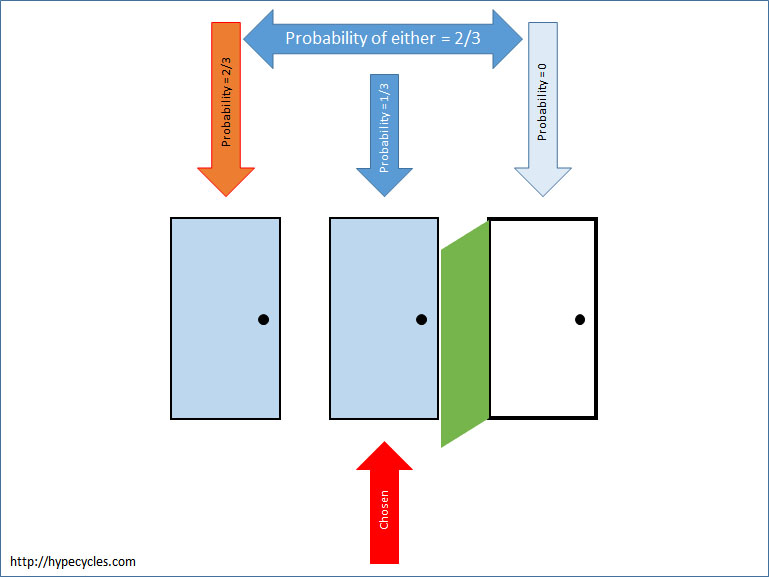 The game show host has picked the third door and there’s nothing there.
However, nothing has changed the fact that the probability that the prize was behind the door that the contestant chose is 1/3 and the probability that it is behind one of the other two doors is 2/3. What has changed is that the host has revealed that it is not behind the door at the far right. If then the probability that it is behind the far left door and the far right door (the two doors that the contestant did not pick) is 2/3, we can say that the probability that it is behind the far left door has to be 2/3.
With this new information therefore, the contestant would be wise to switch his choice.
This article first appeared at http://www.tesora.com/defining-success-in-openstack/
I recently read Thierry Carrez’s blog post where he references a post by Ed Leafe. Both reminded me that in the midst of all this hand wringing about whether the Big Tent was good or bad, at fault or not at fault, and whether companies were gaming the system (or not), the much bigger issue is being ignored.
We don’t incentivize people and organizations to do the things that will make OpenStack successful, and this shortcoming poses a real and existential threat to OpenStack.
Werner Heisenberg observed that the act of measuring the position of a sub-atomic particle affected its momentum and vice-versa. In exactly the same way(s) that Heisenberg said, the act of measuring an individuals (or organizations) performance in some area impacts that performance itself.
By measuring commits, lines of code, reviews and other such metrics that are not really measures of OpenStack’s success, we are effectively causing individuals and organizations to do the things that make them appear “good” on those metrics. They aren’t “gaming the system”, they are trying to look good on the measures that you have established for “success”.
At Tesora, we have always had a single-minded focus on a single project: Trove. We entered OpenStack as the DBaaS company, and have remained true to that. All the changes we have submitted to OpenStack, and the reviews and participation by Tesora have been focused on the advancement of DBaaS. We have contributed code, documentation, tests, and reviews that have helped improve Trove. To us, this single minded focus is a good thing because it has helped us advance the project, and to make it easier for people to deploy and use it in practice. And to us, that is the only thing that really matters.
The same thing(s) are, true for all of OpenStack. Actual adoption is all that matters. What we need from the Technical Committee and the community at large is a concerted effort to drive adoption, and to make it easier for prospects to deploy and bring into production, a cloud based on OpenStack. And while I am a core-reviewer, and I am the Trove PTL, and I wrote a book about Trove, and our sales and marketing team do mention that in customer engagements, we do that only because they are the “currency” in OpenStack. To us, the only things that really matter are ease-of-use, adoption, a superlative user experience, and a feature rich product. Without that, all this talk about contribution, and the number of cores and PTL’s is as completely meaningless as whether the Big Tent approach resulted in a loss of focus in OpenStack.
But, remember Heisenberg! Knowing that what one measures changes how people act means that it would be wise for the Technical Committee to take the leadership in defining success in terms of things that are surrogates for ease of installation, ease of deployment, the number of actual deployments, and things that would truly indicate the success of OpenStack.
Let’s stop wasting time defending the Big Tent. It was done for good reasons, it had consequences. Realize what these consequences are, perceive the reality, and act accordingly.
These days everyone knows someone whose computer was hacked; everyone has heard of others who have been hit by ransomware, and who have suffered significant losses as a result. The losses are sometimes financial, but often they are non-monetary, like losing all family photographs, music, files, and so on.
While it is not possible to entirely prevent these kinds of things, there are some easy steps that we can all take to considerably minimize the likelihood of this kind of thing. It is however equally the case that the majority of these things also make it a little harder to use our computers, and this is by design.
The primary reason why people fall victim to these attacks is complacency, or letting one’s guard down for just a moment. The simple tips below try to prevent that by making it just a little bit harder for you do yourself harm in this way. So here are some tips that I believe we can all take to improve our computers security. I write them from the perspective of a Windows user; if you are a user of a Mac, similar things apply to you but I don’t use a Mac so I don’t know what they are. And, if you are one of those few Linux users, you are likely a nerd anyway and probably can figure this stuff out for yourself.
There used to be a time when the #1 way to make Windows computers safer was to move to a Mac. That is unfortunately not true any longer. Macs are also vulnerable to many of the exploits that we see these days.
One of the horrible things that Windows does on initial installation is to ask you for your name, and setup an account for you. And it makes that user an Administrator. In my experience, most home computer users regularly login using that account.
When setting up a computer, always create a user who will be an administrator, and after the computer is setup, create a regular user who is a standard user. It should look something like this when you look at the users settings.
If the account(s) that are commonly used on your computer are Administrators, do this:
What have you accomplished here?
By making all common users Standard Users, you have made it harder for exploits which typically require Administrator privilege to, well, exploit.
When someone wants to install software, make changes to your computer, and so on they will need to be the Administrator, and will need the password to the “MyComputerAdministratorDingDong” account. This does make it mildly harder to use the computer, but it is a worthwhile safeguard.
Over time, computers accumulate cruft. And if your computer wasn’t secured as described above, you are likely to find lots of cruft. Uninstall anything that you don’t recognize, or don’t use now.
What have you accomplished here?
In addition to potentially making your computer quicker, you have also removed all potentially suspicious software from your machine. Should you need one of them later, you can certainly add it back.
It is amazing that this is still something one has to list. Most ISP’s offer Anti-Virus free, download and install one. If your ISP doesn’t purchase one and install it.
Windows 8 and 10 come with Defender. In my experience they are not quite as good as commercial Anti-Virus software packages. While Defender is free, it is worth getting something else at this stage; maybe someday soon Defender will be better.
What have you accomplished here?
Anti-virus software is an essential part of your protection plan. Make sure you have one; and Windows Defender isn’t (today) the answer.
This should be self-explanatory but passwords like “password”, “homewifi”, and “xfinity” are just too easy to guess! Make it something that is hard to pronounce, uses numbers and punctuation.
My preference is to make it something obscene, that way you won’t be yelling it out to people you meet.
That last thing is something I advocate for all passwords, make them words that you will not utter in public; does wonders for password security.
What have you accomplished here?
Getting on a network with other computers is one of the ways in which a bad actor could infect your computers. By making it harder to get on your network, you have added a layer of protection to your network.
Most households with more than one computer likely share a homegroup and share files, music, and pictures on the homegroup.
If you are not able to secure a computer (as described above) kick that computer off your homegroup, move them to a Guest WiFi network.
So, what do I do about my internet connected TV’s, phones, and other devices which I can’t secure in this way. You could do one of two things, either get another cheap WiFi access point for those, or put them on the Guest WiFi network as well.
What have you accomplished here?
Your homegroup should be a safe space. By eliminating all potentially unsafe actors from the homegroup, you have improved the level of safety there.
Phishing, link highjacking, and numerous other nasty things that cause harm to your computer are caused by clicking on links. So if you receive email that includes links, buttons, and other calls to action, think before you click. Hovering over a link or a button will typically reveal what the action will be.
There is no easy way to tell someone how to recognize a fake email message; scammers are quite sophisticated these days. So just be safe and don’t click on things unless you are really sure you know what you are doing.
But, you can remember these simple tips:
What have you accomplished here?
Many exploits require you to take an action that triggers the installation of the bad software. By taking these steps, you have made it harder for this to happen.
Web browsers and email clients allow you to set these privacy options. And they are well worth setting.
Search for directions for your specific browser and email client and make these changes.
What have you accomplished here?
Many exploits require you to take an action that triggers the installation of the bad software. Automatic downloads and infection buried in some image file formats are one way in which bad actors get around this. By taking the steps described here, you have made it harder for this to happen.
This is particularly important for laptops and computers in shared areas. Enable a timeout and a lock screen. When you step away from the keyboard, lock the computer (Windows Key-L). Require a password to unlock the computer.
What have you accomplished here?
An unlocked computer is an invitation for someone to meddle. A locked computer (with a good password) is significantly harder for one to damage.
One of the most common sources of malware, viruses, and other nasty stuff is shared USB drives. Disabling autoplay along with the steps above can significantly improve the security of your machine.
If you are given a USB drive, consider the source carefully. I prefer to just say “No” and ask people to email the document(s) to me, or to put them on a shared drive like Dropbox.
What have you accomplished here?
Recently a new breed of exploits merely require someone to plug in a rogue USB stick into your machine and the malware gets automatically installed because of autoplay. By disabling autoplay, you make this harder (not impossible).
And if you want to be truly sure, here’s what I do with my laptop when I travel. Reboot the machine to BIOS and disable the USB ports.
That way, when the friendly gentleman comes along and gives you a document on a USB stick, you can safely say it doesn’t work (then blame your IT department for it). If the person insists that he can fix it, you are still safe because no matter how much he jiggles the USB stick in the port, it won’t work.
On one occasion, a particularly persistent (read: pesky) individual said he knew what was wrong, that the port was disabled in the BIOS. And he went to reboot the computer to BIOS and sure enough “My IT Department” had set a password on that and damn them because I don’t know what it is.
What have you accomplished here?
Similar to the earlier step, you make it much harder for bad actors to infect your computer using the USB port as the attack vector.
As you can likely see, each of these steps will make it just a little bit harder to use, and enjoy your computer. But as the adage goes, “no pain, no gain”.
Of late, I wake up every morning revving to go and work on the next cool thing in Trove and I see that overnight some well-meaning person has contributed a change that looks something like this:
String interpolation should be delayed to be handled by the logging code, rather than being done at the point of the logging call.
Ref:http://docs.openstack.org/developer/oslo.i18n/guidelines.html#log-translation For example:
# WRONG
LOG.info(_LI(‘some message: variable=%s’) % variable)
# RIGHT
LOG.info(_LI(‘some message: variable=%s’), variable)
And the code submitted fixes a small number (lets say 5) places where strings sent to logging are rendered.
As I said at the TC-Board meeting in Barcelona, these well-meaning people are actually submitting what on the face of it appear to be valid corrections to the code. Yet, I submit to you that these changes represent a scourge that we should stamp out.
I know for a fact that in Trove there are (currently) 751 occurrences of this particular style error. This is the hacking extension H904, and when enabled in Trove, I get this:
$ tox -e pep8 | grep H904 | wc -l
751
That’s the catch, Trove does not enable this hacking extension. A quick look indicates that only Neutron does.
Why are these well meaning changes a scourge? Here’s why …
So, I submit to you that if you want to submit a patch to fix one of these hacking issues, here is the right way. Of course, I’m opinionated, I’m going to reference one of my own changes as an example!
Well, that’s a lot of work! Sure, you really have to work for your Stackalytics credit, right? I’m sure the load on the CI system will show that this is worthwhile.
It is better to do things this way in the long run. With the hacking rule enabled, future commits will also comply with the rule (they will fail pep8 if they don’t). And that will put an end to the cottage industry that has sprung up around finding these kinds of errors and fixing them one at a time.
In conclusion I urge reviewers in all projects to summarily reject style changes that don’t also enable a hacking rule. Approving them is the wrong thing to do. Require the contributor to enable the hacking rule, and fix the problem the right way. That’s what a good code review is about.
https://www.raspberrypi.org/blog/meter-maid-monitor-parking-protection-pi/
This is just brilliant. I think only good things can come from this.
Lintel Technologies: Python: new magic method explained
See: http://howto.lintel.in/python-new-magic-method-explained/
How To Build Your Own NAS From Scratch (With Parts List!)
A very nicely written article with some clear advice.
http://digital-photography-school.com/preparing-images-print-display/
In May 2015, I wrote about the risks of handing out your email address and making a mistake. (That post appeared on facebook at the time).
Well, it appears that the person handing out my gmail address isn’t just one person; we now have a second.
Someone handed out my email address and applied for life insurance. And the agent promptly emailed the entire application packet to me!
This time, it had a phone number so I called the guy. After explaining (what seemed like an eternity) that I had his application packet, I asked him what his email address was.
His answer “amrith something dot com”.
Oh boy!
Google-Funded Free Wi-Fi Kiosks Are Scrapping Web Browsing Because Too Many People Were Using it For Porn
Really? They can’t put simple Web filtering in place? This is lame.
A Teenage Hacker Figured Out How To Get Free Data On His Phone. Awesome!
When I resurrected this blog, I lamented the loss of history and old posts from the time when this blog was hypecycles.wordpress.com and pizzaandcode.com.
Well, thanks to the wonders of the internet (and help from my friend Daniel Senie) I was able to recover all of the old posts and add them back to this blog!
History going all the way back to sometime in 2009 is now back online.
I have long believed that it is ok to make any given mistake once. But to make it again is, I believe, unforgivable.
This should, I believe, apply to all things that we do as software developers, and to that end, I feel that code changes to fix issues should be backed up in some way by testing that prevents recurrence of problems.
In my day job, I work on the OpenStack Trove project, and when I review changes proposed by others, I tend to apply this yardstick. When someone fixes a line of code to correct some issue, it is common to expect that there will be a test to verify this operation in the future.
Recently, I reviewed and approved a change that pretty immediately resulted in a regression. Here’s the diff of the code in question:
     if not manager:
-        msg = ("Manager class not registered for datastore manager %s" %
+        msg = (_LE("Manager class not registered for datastore manager %s") %
                CONF.datastore_manager)
         raise RuntimeError(msg)
Not being a compiled language, and since no tests exist for the case where manager is None, this code was never exercised, and _LE was not defined. Sure enough a couple of days later, the regression was reported.
This got me wondering how the problem could be avoided. Surely python must have some tools to catch this kind of thing. How did this escape the development process (obvious explanation of sloppy code review aside).
It turns out that there is a mechanism to catch these kinds of things, pylint. And it turns out that we don’t use pylint very much in OpenStack.
Well, a short while later I was able to run my little pylint based wrapper on Trove and fix some egregious bugs.
pylint doesn’t natively give you a way to provide a specific set of issues that must be ignored (something which bandit does). So I modeled this wrapper on the way bandit does things and allowed for a set of ignored exceptions.
I’ll make this a job in the Trove gate soon and that will help stamp out these kinds of issues more quickly.
Really? Uber for your kitchen? Will they be regulated like restaurants?
VizEat, a startup that lets you dine in a local’s own home, gobbles up €3.8M funding https://techcrunch.com/2016/09/06/vizeat/amp/
SETI has observed a “strong” signal that may originate from a Sun-like star
Continue reading “SETI has observed a “strong” signal that may originate from a Sun-like star”
VMware says, “We’re not dead,” updates Fusion and Workstation for free
Enlarge /VMware Fusion 8.5 for Mac, with tab support.
Continue reading “VMware says, “We’re not dead,” updates Fusion and Workstation for free”
Tips for Shooting the Milky Way
Seeing the Milky Way with your own eyes is what you may call a jaw dropping experience, but one that can be truly achieved only in complete darkness. While stars are visible even in light polluted areas, the Milky Way’s beauty, which is actually caused by concentrations of stars, gas and dust, fades away in the light polluted areas and cannot be seen.
Circular Polarizers Versus Graduated Neutral Density Filters for Landscape Photography
Whether you’re a professional or hobby photographer, odds are you’ve come across a beautiful, scenic landscape, that you absolutely had to photograph. Unless you’re an experienced landscape photographer, there’s a good chance the color in that photo wasn’t as saturated, or balanced as you were expecting. That’s because there’s generally a wide disparity in the dynamic range between the foreground and background of landscapes, as well as between the upper (sky) and lower (earth) halves of the frame. Thanks to a couple of lens filters, this hurdle can easily be overcome without having to spend hours of post-processing in Photoshop.
How and Why to Use Back Button Focus
Common Photography Mistakes Newbies Make and How to Avoid Them
Every shooter will tell you that they all made the same photography mistakes when they were starting out. From horizon lines not being straight to poor focusing, here are some of the most common newbie mistakes and how to avoid them.
Continue reading “Common Photography Mistakes Newbies Make and How to Avoid Them”
This is How Light Pollution Affects How We See the Night Sky
Continue reading “This is How Light Pollution Affects How We See the Night Sky”
Of late, I’ve spent a fair amount of time debugging Trove’s gate failures. And this isn’t the first time, it generally happens around release time. And each time, I relearn the same things. So this time, I’ll make a note of what I’ve done recently. Hopefully, it’ll ease the process next time.
It is almost that time of the year again and that means it is time to start brushing up of the fall color tips and tricks.
6 tips for shooting fall color
https://www.dpreview.com/techniques/4329601714/6-tips-for-shooting-fall-color
This is huge news!
Leading India e-commerce site launches OpenStack hybrid cloud
Just to give you a sense of the size of this company, consider this:
Snapdeal has already cornered about a quarter of the Indian e-commerce market, that’s twice as much as Amazon but about half of its largest local competitor Flipkart, in what some are calling the “great race” to rule what may become the world’s largest online marketplace. With the fastest growing e-commerce market, Snapdeal reaches people that brick-and-mortar businesses can’t, since half of its customers live outside India’s biggest cities.
In this interview, learn more about how OpenStack’s Trove and Manila projects are adapting to meet the varied database needs of cloud users..
Source: Expanding DBaaS workloads with OpenStack Trove and Manila
Some day, I want to do this! I’ll post some of my attempts at this in a later post.
High speed photography is great for capturing the moment when two water droplets collide and make incredibly beautiful fluid impacts.. Read more on MAKE The post Capture Incredible Water Droplet Impacts with a High Speed Camera Rig appeared first on Make: DIY Projects and Ideas for Makers ..
Source: Capture Incredible Water Droplet Impacts with a High Speed Camera Rig
Ron Bradford posted this interesting article on his blog after a recent trip I made to New York City.
Trove is used for self service provisioning and lifecycle management for relational and non-relational databases in an OpenStack cloud.. Trove provides a RESTful API interface that is same regardless of the type of database.. CLI tools and a web UI via Horizon are also provided wrapping Trove API requests..
Source: Utilizing OpenStack Trove DBaaS for deployment management
When it comes to the list of digital imaging pioneers, Marc Levoy is one of those names that belongs right near the top.. His work has led to many of the technical advances that we see in use today with computer generated imagery..
Source: Stanford Professor puts his entire digital photography course online for free
This post appeared first at the Tesora blog.
I was recently asked what resources I would recommend to someone looking to get started with OpenStack. I’d like to provide them here for those who may be beginning their OpenStack journey.
Continue reading “Get Started with OpenStack – 5 Easy Steps”