Microsoft Yanks Windows RT 8.1 Update
http://allthingsd.com/20131019/microsoft-yanks-windows-rt-8-1-update/
—–
That was quick 😉

Microsoft Yanks Windows RT 8.1 Update
http://allthingsd.com/20131019/microsoft-yanks-windows-rt-8-1-update/
—–
That was quick 😉
How IBM is making computers more like your brain. For real
Fossil Find Points To A Streamlined Human Lineage
http://www.npr.org/2013/10/17/236171952/fossil-find-points-to-a-streamlined-human-lineage
If Landlines Disappear, What Happens in a Blackout?
If it is, you read it here first!
I posted this article on my other (work related) blog.
Technologies come and technologies go but the underlying trends are worth understanding.
I just posted this article on my other (work related) blog.
http://www.parelastic.com/blog/ingesting-over-1000000-rows-second-mysql-aws-cloud
Just to be clear, this was with standard MySQL, InnoDB, and with machines in Amazon’s cloud (AWS).
The data was inserted using standard SQL INSERT statements and can be queried immediately using SQL as well. All standard database stuff, no NoSQL tomfoolery going on.
This kind of high ingest rate has long been considered to be out of the reach of traditional databases; not at all true.
Are cloud platforms saying goodbye to the hypervisor?
The Best Pizza In 10 Big Cities Around The US
http://www.businessinsider.com/the-best-pizza-joints-in-10-us-cities-2013-10
It turns out that not a lot of people attempt to program against the AWS REST API in C. I discovered this the hard way when I needed to do it.
You’d have thought that there would be some libraries for it; turns out that this isn’t the case.
libs3 is one but it isn’t particularly general purpose. And S3 turns out to be surprisingly unlike EC2 and other services. Also, Amazon’s own documentation is surprisingly bad.
So if you end up here because you want to interact with AWS in C, the tips below may help you.
I used libcurl; I’m sure you could do the same thing some other way …
The trick is in computing the signature of the request.
Assume that you want to execute the DescribeInstances API call.
You need to construct a signing request which must basically include an unambiguous representation of the API request. Since you may have many parameters to the API request, you must sort the parameters into alphabetical order first.
1. Construct the timestamp this way:
 411     static char * __aws_api_get_timestamp (char * buffer, int sz)
 412     {
 413         time_t t = time(NULL);
 414         struct tm * gmttime = gmtime (&t);
 415
 416         strftime (buffer, sz, "%FT%H:%M:%SZ", gmttime);
 417         return buffer;
 418    }
2. Every signing request must have 5 AUTHPARAMS; the documentation talks about 4 but there are 5 …
Version: This is the API Version. I've used 2013-08-15
SignatureVersion: I use 2
SignatureMethod: I use HmacSHA256
Timestamp: As computed above.
AWSAccessKeyId: Your AWS Access Key
While it isn’t an AUTHPARAM, you also need the Action in a signing request. That is the API name.
3. Construct the signing request.
The signing request takes the following format.
%sn%sn%sn%s
where the four strings are (in order)
(a) The submission method (POST or GET)
(b) The endpoint
(c) The path
(d) The request URL.
So, for my DescribeInstances request, the signing request is.
POSTnec2.amazonaws.comn/nAWSAccessKeyId=AKIVP30P3L0A5NKGTIQ&Action=DescribeInstances&SignatureMethod=HmacSHA256&SignatureVersion=2&Timestamp=2013-10-13T20%3A55%3A06Z&Version=2013-08-15
Note that the method is POST.
The end point is ec2.amazonaws.com
The path is “/”
The request with the sorted attributes starts with my AWSAccessKeyId (no, that’s not my access key …) the Action which is DescribeInstances, and the other AUTHPARAMS.
Note that the string was escaped the way a URL would be escaped; you can see that in the timestamp.
You can now compute the signature for this; I used HMAC. Once you compute the signature for the request, you base64 encode the signature.
4. Construct the Request URL
This is nothing more than the request URL in the signing request with the base64 encoded signature tacked on. Of course, there’s no requirement that in the API parameters in the final request URL be alphabetically sorted.
That’s all there is to it!
I’m not sure whether this is a mistake or not but Staples stores are selling the Samsung Galaxy Note 8″ for $299.
The Web site still has the $359 price but stores are willing to honor the price for an online order.
I just got Best Buy to match the price 😉
8 Things Not to Miss in Istanbul
http://www.huffingtonpost.com/the-gypsynesters/istanbul-travel_b_3990946.html
I really enjoyed visiting Istanbul several years ago and some of these pictures bring back good memories.
Recently I saw an article on the MongoHQ blog where they described a “slow query” and how to improve the performance.
The problem is this. I have a document with the following fields:
And the status can be something like ‘published’, ‘rejected’, ‘in progress’, ‘draft’ etc.,
I want to find all articles with some set of statuses and sorted by submit date.
Apparently the MongoDB solution to this problem (according to their own blog) is to:
Really? Really? You’ve got to be kidding me.
For more on this interesting exchange, a response from a MongoDB fanboy, and a follow-up, read my work blog at
http://parelastic.com/blog/more-subject-improving-performance-removing-query-logic
The things people have to do to use NoSQL, boggles the mind!
Great article about things to watch out with app store malware.
http://feedproxy.google.com/~r/readwriteweb/~3/TyDy5XmmB-Y/the-best-ways-to-find-your-stolen-mobile-device.php Who would have thought I could use dropbox for this. By extension, gmail (and the last logged in from feature) could also be used.
http://feeds.harvardbusiness.org/~r/harvardbusiness/~3/klg5cuIqJF8/in_india_distribution_is_god.html As awesome little post from the Harvard business review blog about distribution channels in India.
After getting the email this morning about the new provisioned IOPS EBS volumes, I took a small test drive. 
It is really easy to get yourself a provisioned IOPS volume; when creating the volume there’s a new selection.
One of the things that has long annoyed me about Amazon EC2 network and storage performance is that it is highly variable. The target for provisioned IOPS is exactly in the sweet spot of where I want it to be; database servers.
With provisioned IOPS, it appears that we’re seeing the first semblance of SLA’s or guaranteed quality of service for storage in the cloud. This is huge!
I’ve setup a multi-volume RAID set and am running performance tests and the numbers look good but what I like the most so far is that they are steady. That’s just awesome! More to come as I get the results.
I agree with all but one of these; I can’t see myself using DM or tweets for quick interactions.
From my backlog of reading comes this article from Rob Go’s blog, http://bit.ly/LYsbdK describing in very simple terms why it is that you hear a VC make the stipulation of a minimum ownership when they invest in a company.
As with other things related to VC funding, the more I learn about it, the more I’m convinced that it is a wonderfully simple subject at the very core. However, the terminology and legality surrounding various aspects of VC funding have taken pedestrian mathematics involving no more than addition, subtraction, multiplication and division into an esoteric subject and a minefield for entrepreneurs.
A great read for any entrepreneur!
http://www.hightechinthehub.com/2012/07/what-your-personal-email-address-says-about-you/
A form of profiling that isn’t illegal!
http://blogs.wsj.com/digits/2012/07/09/samsungs-galaxy-tab-not-as-cool-as-ipad-says-judge/?mod=WSJBlog&mod=WSJ_FinancingAndInvesting_BLOGSDIGITALDAILY Really? Can a judge actually rule based on his impression of coolness of a product? Can you actually take tips on Collins from a person who wears a white wig?
http://tech4b.blogspot.com/2012/07/cern-announces-discovery-of-new.html
It didn’t take long with the LHC!
http://the-gadgeteer.com/2012/07/03/excuse-me-sir-i-think-thats-my-seat/ Now, that’s a good idea! Very topical, if you want to save your seat to watch the fireworks today!
http://the-gadgeteer.com/2012/07/02/volt-buckle-the-worlds-first-and-only-wearable-mobile-device-wall-charger/ Would you tape of your pants to charge your smartphone?
http://www.hightechinthehub.com/2012/07/penny-per-gigabyte-per-month/ Interesting article. Can’t wait for that day!
From an article in the Connecticut Post, see complete article here.
Really, we need a study by experts to tell us this?
In addition to the new law in Massachusetts, here are some other tough laws about distracted driving.
New Jersey: the “Kulesh, Kubert and Bolis Law,” after three distracted-driving victims.
The bill allows prosecutors to charge drivers who kill or injure someone with vehicular cellphone or assault by auto. It makes driving while illegally using the phone “reckless” instead of “careless” driving, a necessary change to allow for vehicular homicide, a felony, to be charged.
Utah:
Utah law treats driving while intoxicated with a .08 blood-alcohol level and driving while using a handheld cellphone the same.
Penalties can be as harsh as 15 years in prison.
http://www.drdobbs.com/architecture-and-design/dr-dobbs-2012-salary-survey/240002742
Definitely a must read article for any job seeker or interviewee; make sure to read and understand the trends before you negotiate.
Also for anyone who wants to speak with their manager about a raise our a bonus.
It does confirm some will known trends:
* Salaries on the coasts are higher.
* IT still pays will by comparison to jobs that are not in the knowledge economy, and pay reasonably well among the skilled professions.
Unfortunately, with a fairly large sample size, it also confirms some more disturbing things:
* Ageism is alive and well.
* Sexism is alive and well.
Another good article on the subject of the new C language standard.
http://www.drdobbs.com/cpp/the-new-c-standard-explored/232901670?pgno=1
http://www.drdobbs.com/cpp/c-finally-gets-a-new-standard/232800444
Some very interesting changes being proposed here. A good read on the new C language standard.
Do you like it that you get these messages whether you want them or not? Do long as they aren’t spam I would not mind them.
I’ve been annoyed by the fact that public internet providers are slipstreaming content, and also that accessing public internet access points is a potential security risk. I refer, for example to this earlier post on my blog. For some time now I have been muttering about a personal VPN and some months ago I setup one for myself. It has worked well and over the past several months I have occasionally tweaked it a bit to make it more useful. Others may have a similar interest so here is a simple how-to that will give you an inexpensive personal VPN.
There is a wealth of information about VPN’s and PPTP on the web. I refer you to the Wikipedia articles in particular, this one on the subject of VPN’s and this one on the subject of PPTP. A good article about another kind of VPN called OpenVPN is found here. For my purposes, I have found PPTP to be satisfactory and have resisted the urge to upgrade to OpenVPN.
I implemented my VPN solution two ways. The first was using my home Ubuntu machine as the VPN server. The second was using an instance in the Amazon EC2 cloud. I will describe below the mechanism for implementing a VPN in the EC2 cloud and provide a small addendum on how you could do this with a server at home.
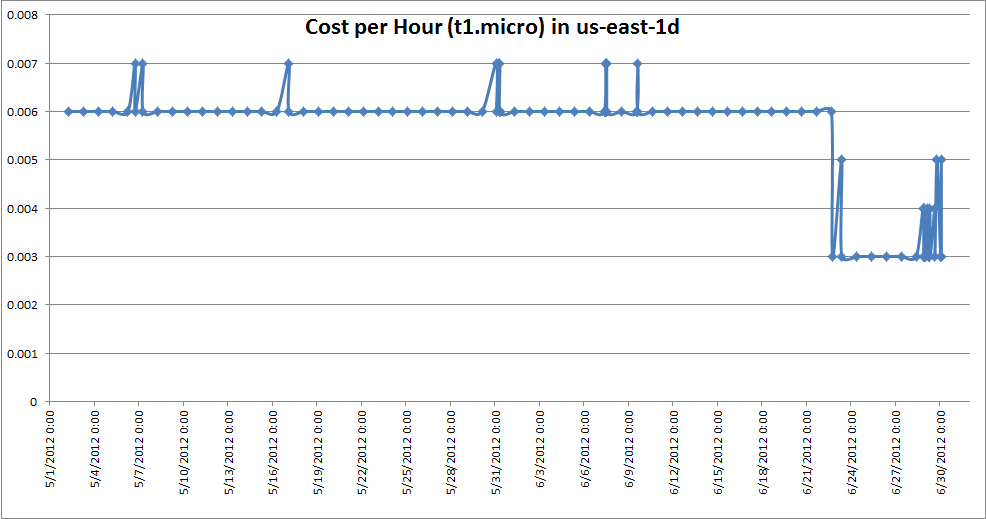
If you run the VPN the way I suggest, on a micro instance in Amazon’s EC2 cloud, the cost is very low. I run my instances as spot priced instances and invariably a t1.micro at spot price is less than a penny an hour.
Here is the price graph for some months, I’ve carefully cut the data for the last couple of days off because the power outages in the Amazon us-east AZ caused the price to jump to a dollar and that makes the graph less attractive 😉 Seriously, that is an aberration, my VPN server is setup with a price cap of $0.02 per hour and it died when then price shot up. I restarted it manually at the standard price when that happened.
In addition, depending on how much data you send over the VPN, you will also be assessed a charge for data transfer. I have found that to be minimal. Since I run my VPN on my personal Amazon account (we also use EC2 for work), I get the benefit of the Free tier for the first year and the VPN hasn’t exceeded the free tier usage at any time.
Of course, if you run the VPN on a server in your house, you don’t have to worry about these costs; all you have to ensure is that you can reach the VPN server from any place. More about that later.
Step 1: Launch EC2 instance to customize VPN AMI
I launched an EC2 instance based on the stock 12.04 LTS AMI provided by Amazon. A t1.micro instance is more than sufficient for this purpose. If you are using some other cloud provider or are planning to do this on a machine at home, get yourself access to a machine that has some recent flavor of Ubuntu or Linux and to which you have root access.
If you are doing this in Amazon, you must first setup the security group for this instance, before you launch the instance. Skip forward to step 6 in this how-to and setup a security group as described there and launch your EC2 instance using that security group.
Step 2: Install and configure the VPN Software
sudo apt-get update
sudo apt-get install pptpd
The configuration itself is quite straightforward.
First you need to identify the range of IP addresses that will be used by your VPN. This includes the IP address that your VPN Gateway will use, and the IP addresses for the hosts that connect to the VPN Gateway. For a variety of reasons, I chose to set my VPN Gateway at 10.40.1.1 and the IP Addresses it gave out at 10.40.1.20-10.40.1.50. This setting is in/etc/pptpd.conf, edit using your favorite text editor, remember you must be root to do this.
localip 10.40.1.1
remoteip 10.40.1.20-50
Your PPTP Server will hand out IP Addresses and DNS settings to clients. It is a good idea to set DNS Server settings in the PPTP Server so that clients can do name resolution. This is done in /etc/ppp/pptpd-options, edit using your favorite text editor, remember you must be root to do this.
ms-dns 8.8.8.8
ms-dns 8.8.4.4
ms-dns 172.16.0.23
I chose to specify above that the PPTP Server should hand out the addresses of the Google public DNS Servers and the Amazon public DNS Server. You can use any servers you want.
Finally, configure the PPTP Server with login credentials. You can setup as many users as you want on the PPTP Server, I chose to setup three. For simplicity, let me call them user01, user02 and user03. I use a random password generation script to make up the passwords, something similar to the one described here.
User name and password are stored in the file /etc/ppp/chap-secrets. Edit it with a text editor and add lines line these into it, one per user that you wish to setup.
USERNAME pptpd PASSWORD *
So, I added the following three lines:
user01 pptpd osvCylQX *
user02 pptpd TIRUssa3 *
user03 pptpd nJ6ljIBf *
Using this handy little script
#!/bin/bash
echo "user01 pptpd osvCylQX *" | sudo tee -a /etc/ppp/chap-secrets
echo "user02 pptpd TIRUssa3 *" | sudo tee -a /etc/ppp/chap-secrets
echo "user03 pptpd nJ6ljIBf *" | sudo tee -a /etc/ppp/chap-secrets
At this point, your PPTP Server is mostly ready to go. Just a couple of more things to take care of.
Step 3: Enable IP Forwarding and NAT
IP Forwarding is not enabled by default on Ubuntu. You can do that by editing /etc/sysctl.conf and then updating the system. Uncomment this line in /etc/sysctl.conf:
net.ipv4.ip_forward=1
and update system configuration
sudo sysctl -p
Update /etc/rc.local and add the following two lines to make NAT work properly. Update the interface name to suit; I used eth0, you may have to use something else.
iptables -t nat -A POSTROUTING -o eth0 -j MASQUERADE
iptables -I FORWARD -p tcp --tcp-flags SYN,RST SYN -j TCPMSS --clamp-mss-to-pmtu
Step 4: Making your server accessible remotely.
If you are using a server in the cloud, or if you are using a home machine, there is a chance that it’s public IP address will change from time to time. For example, your server in EC2 may be restarted, your home ISP may reassign your IP Address etc., I use a Dynamic DNS system to make my servers always accessible. Personally, I have had good luck with the DDNS service provided by Dyn. Even if you choose to use their free trial to begin with, if you use your VPN at all, you will have no problem spending the $20 per year for this very good service.
sudo aptitude install ddclient
Most of the configuration you need will be done during the installation but just to be sure, go and look at the file /etc/ddclient.conf.
You can use the handy-dandy configurator at Dyn to get the right incantations.
My /etc/ddclient.conf file has the following in it.
## ddclient configuration file
daemon=3600
# check every 3600 seconds
syslog=yes
# log update msgs to syslog
mail-failure=<my email address> # Mail failed updates to user
pid=/var/run/ddclient.pid
# record PID in file.
## Detect IP with our CheckIP server
use=web, web=checkip.dyndns.com/, web-skip='IP Address'
## DynDNS username and password here
login=<dyn user name>
password='<dyn password>'
## Default options
protocol=dyndns2
server=members.dyndns.org
## Dynamic DNS hosts
<HOST NAME>
Step 5: Restart the PPTP server
This is the final step to get the things all up and running.
sudo service pptpd restart
And you should be up and running!
Step 6:Setting up your firewall for remote access.
Irrespective of whether you are using an Amazon EC2 instance of a machine in your own house, you will likely need to tweak your firewall to make things work correctly. Amazon calls the firewall a security group, configure it to allow incoming connections on TCP Ports 1723 (and 22 for SSH). I also open ICMP so I can ping it to make sure it is responsive. On Amazon I also tend to leave all ports open for loopback.
ICMP ALL 0.0.0.0/0
TCP 22 (SSH) 0.0.0.0/0
TCP 0-65535 (this security group)
TCP 1723 (PPTP) 0.0.0.0/0
UDP 0-65536 (this security group)
Note regarding in-home setup: You can ignore the last two for your in-home configuration. Depending on the router of network access device you have, you may have to setup port forwarding rules. See the documentation for your router/access point for details.
First, attempt to ping your server from a client machine. Shown here from my Windows PC.
C:Usersamrith>ping hostname.dyndns.org

Pinging hostname.dyndns.org [107.22.65.185] with 32 bytes of data:
Reply from 107.22.65.185: bytes=32 time=23ms TTL=46
Reply from 107.22.65.185: bytes=32 time=23ms TTL=46

Ping statistics for 107.22.65.185:
    Packets: Sent = 2, Received = 2, Lost = 0 (0% loss),
Approximate round trip times in milli-seconds:
    Minimum = 23ms, Maximum = 23ms, Average = 23ms
Control-C
^C
C:Usersamrith>
As you can see, my Dynamic DNS entry has worked and the name resolution is working correctly.
Then attempt to connect to the VPN. On Windows and Android this is relatively straightforward.I had a little trouble with Ubuntu. My Ubuntu machine is running 10.04 LTS, note that machines running versions of Ubuntu prior to 10.04 require additional configuration before you can make PPTP work properly.
Note for Ubuntu Users:
You may find that your VPN works properly from Windows and Android (for example) but it doesn’t work on Ubuntu. This is what happened for me.
You need to perform one additional configuration step on Ubuntu clients and that is to add a line into the chap-secrets file.
Here is what I have in my /etc/ppp/chap-secrets file on one of my Ubuntu client machines.
# Secrets for authentication using CHAP
# client        server  secret                  IP addresses
user01 pptpd osvCylQX *
It is basically the same line as you used in step 2 above.
With this line, connection from Ubuntu was effortless.
The setup above will come up automatically when the machine is restarted, it will automatically register with Dynamic DNS and should work well for you. For users of Amazon EC2, one final step remains.
Step 7: Make an image of your VPN Server
Use either the GUI or the ec2- CLI and make yourself an AMI. Then you can setup a script that will launch a persistent spot request for a t1.micro server using that AMI.
Once you make an AMI, shutdown the VPN server you created above and launch your AMI, I use this script.
#!/bin/bash

ec2-request-spot-instances -t t1.micro ami-<id goes here> --price 0.02 --instance-count 1 -r persistent -k my-ec2-keypair -g vpn-security-group
As you can see, I launch a t1.micro instance and am willing to pay no more than 0.02 (2 cents) per hour and I want this request to be persistent. It has worked well for me.
1. Some sites don’t work, others do.
I used to have this problem and tracked it down to an issue with packet sizing. You should not have this problem if you correctly followed step 3 above. The two commands for iptables (the second in particular) was something I added to fix this problem.
2. Problems connecting from Ubuntu.
I used to have this problem and the “Note for Ubuntu Users” in the Testing section was the response. If you are using Ubuntu prior to 10.04, you will need to follow the additional instructions here. It would be much easier if you upgraded 😉
3. After rebooting my VPN, I cannot access it OR
4. From time to time I am unable to access my VPN.
The first thing to do is to make sure that you are able to ping your VPN server. If you configured your firewall the way I proposed above, you should be able to do this. Use the same name that you are providing to your VPN connection. If you are unable to ping the server, you know to start looking outside your VPN server, if you are able to ping your VPN server, attempt to SSH to it and make sure you are able to connect to it. This latter step is important because you want to make sure that you are in-fact pingingyour VPN server, not one that happens to be responding to the name you provided.
If you are able to SSH to the VPN server but not connect to it using a VPN client, it is time to start looking at the log files from the VPN server (/var/log/syslog) and troubleshooting your configuration.
I’ve generally found that if the initial AMI you setup works well, it is easiest to just restart the VPN server and go from there.
http://techcrunch.com/2012/06/19/samsung-galaxy-s-iii-review/ And as they say in the Lord of the rings, ‘and one phone to rule them all’ or something like that;)
Problem: kids are hanging out in public places and swearing causing a public nuisance. Solution: impose a$20 fine. Really? Want to try and find out why they are hanging out in the public places first? Maybe they don’t have enough to do, like homework, a job, a home to go to? http://pocket.co/sy1x
http://acrowdedspace.com/its-all-about-team-but-ever-wonder-why-no-vcs
Another great read, I found it referenced on Brad Feld’s blog …
http://www.xconomy.com/boston/2012/06/15/top-10-quotes-from-xsite-2012-bill-warner-andy-ory-phil-libin-more/ I was only able to stay for the first three speakers, Evernote, Watson, and Birchbox. Phil Libin’s talk was awesome especially seeing the graphs showing user count and cohort analysis.
A valuable read for any entrepreneur. http://feedproxy.google.com/~r/FeldThoughts/~3/p7qCu3G1VKc/its-hard-to-tell-someone-they-suck.html
All I can say is Oh Crap!
HP’s rationalization of its business strategy choices and acquisitions.
Interesting, but will my printer work any better next year? I guess we don’t know yet …
http://pogue.blogs.nytimes.com/2012/06/05/battery-power-drives-screen-size/ An interesting, but when you think about it an obvious thing. You have density, size and thickness. Since we seem to want thin, and density (watts-hours per cubic inch) is growing at its own rate, you only have size to play with!
http://www.hightechinthehub.com/2012/06/6-steps-to-9-dollar-unlimited-voice-data-text/
Sounds interesting. I think I will try this out.
I just posted this article on the ParElastic blog
http://www.parelastic.com/database-architectures/parallel-databases-and-sharding-part-ii/
http://www.gregarnette.com/blog/2012/05/cloud-servers-are-not-our-pets/ Interesting post by Greg, I never thought of it in those terms but I do remember names of servers from many previous employers…. names of planets, places, animals, … Not any more.
I just posted an article comparing parallel databases to sharding on the ParElastic blog at http://bit.ly/JaMeVr
It was motivated by the fact that I’ve been asked a couple of times recently how the ParElastic architecture compares with sharding and it occurred to me this past weekend that
“Parallel Database” is a database architecture but sharding is an application architecture
Read the entire blog post here:
Here is the synopsis:
Over the past 6 months, we’ve “scaled” MongoDB by moving data off of it.
Read the complete article here: http://bit.ly/HIQ8ox
http://www.hightechinthehub.com/2012/04/top-5-challenges-migrating-to-a-new-cloud/
The need for standardization and some common API’s … Things like Open Stack & Eucalyptus, … maybe?
 Hype Cycles