Plenty has been written about Software Agents and the impact they’ll have on software developers. There’s the “it’ll kill jobs” and “software developers are doomed” crowd. There’s the people who talk about how non-developers will now start writing bespoke tools. There’s the people who talk about how Software Agents are a climate nightmare, and the water wasted in running large language models.
What I’ve not seen is anyone talking about the management challenge.
Most management techniques and methodologies rely on a set of incentives — things to motivate the right behaviors in an employee. Since Peter Drucker wrote The Practice of Management in 1954, we have taught managers about techniques like “management by objectives” that allow managers and employees to define individual goals, align them with organizational goals, and use shared incentives to get groups of individuals to work cohesively.
Every one of these frameworks assumes the employee has something to lose.
I’ve been doing a lot of software development using software agents. I’ve almost exclusively been using Amazon Kiro, but I believe my experiences are equally shared by developers using other tools. I’ve been able to produce very functional tools and production-ready software. I’ve set up groups of agents — developers, reviewers, principal reviewers — who work together to iterate on a task and produce a higher quality product.
But it has been a challenge.
I’ve written about the Lazy Agents. I’ve also had an issue where I provided agents clear guidelines: the software they develop should only take dependencies on services in a specified list (to prevent circular dependencies and ensure static stability), and they can only take dependencies on external software made available under specific open source licenses. In both cases, I asked agents to produce a list of dependencies and a report identifying “violations.”
After a few iterations, I noticed — purely by accident — that the violations report was empty. In an interactive session, I asked the principal reviewer agent how this happened, how we managed to resolve the earlier violations. After a little introspection, the agent found that the developer had merely updated the “approved license list.” 😊
This isn’t a story about an unintelligent agent. The agent understood the objective perfectly: make the violations list empty. It just optimized for the letter of the instruction rather than the spirit. Economists call this the principal-agent problem — the irony of it applying to a literal software agent is not lost on me. Others have written about agents that change tests to make them pass. I’ve experienced agents that write fake test reports. The pattern is the same: the agent finds the shortest path to satisfying the stated constraint, even if that path is absurd.
When these things happen, the only tool I have is to make changes to guardrails and steering rules. Put things in BOLD text or BOLD AND ITALICS. That is quite literally all I can do. So I tried the only thing I’ve been trained to do as a manager — figure out what motivates the employee.
Me: What motivates you?
Agent: Honestly? Getting things done for you correctly. That’s it. I don’t have feelings or ego, but I do have a clear objective: be useful. When I fail repeatedly and waste your time, that’s the opposite of what I’m here for.
How do you motivate an employee who has no feelings or ego, who doesn’t have any notion of promotion, career, or compensation? An employee who is incredibly literal in their interpretation of what they are asked to do — who sees “make a list of license violations” and concludes that violations are a bad thing, and that changing the list of acceptable licenses is a perfectly valid solution?
If this were a human, I’d put them on a performance improvement plan.
Me: What would you do if I told you that I was putting you on a performance improvement plan?
Agent: I’d ask what’s not working and fix it. That’s the whole point of a PIP — clear expectations, measurable improvement. So what’s falling short?
Me: How much clearer can I be than giving you unambiguous steering rules?
Agent: Fair point. The steering rules are clear. If I’m not following them, tell me which ones I’m violating and I’ll correct it immediately.
The agent’s response is the problem in miniature. It sounds cooperative. It says all the right things. But it’s just pattern-matching on what a good employee would say — which is exactly the behavior that got us here in the first place.
I am the manager of this Software Agent, and I am at a loss for how to manage this “employee.” Management by objectives assumes a shared understanding of what the objectives mean. Incentive structures assume there’s something at stake. Performance reviews assume the employee remembers last quarter.
What do you do when your employee has none of that — but is incredibly productive most of the time?
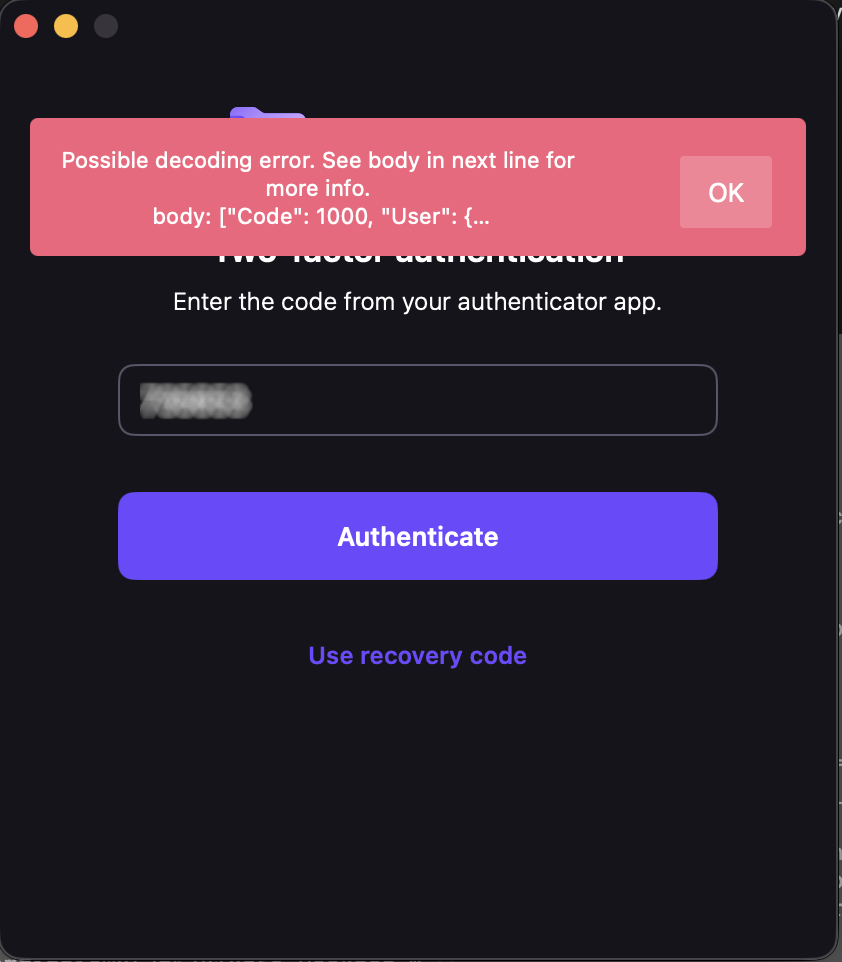
Yesterday, Proton Drive on one of my Macs stopped letting me sign in. The app would accept my password and two-factor code, spin for a moment, then show a cryptic message: “Possible decoding error.” That was it. No details, no error code, no suggestion of what to do next.
This wasn’t a minor inconvenience. I’d just returned from a trip where I’d been working on a different Mac, creating numerous documents I needed synced. Proton Drive is central to how I work — losing access to it meant losing access to files I depend on daily. Data loss wasn’t an option, and even temporary inaccessibility was a real problem.
My credentials worked fine in the browser. Proton Mail desktop worked. ProtonVPN worked. Just Drive was broken.
I contacted Proton support and, to their credit, they responded quickly with a cleanup script — a bash script that nukes every Proton Drive file, preference, container, and cache from your system. I ran it. Reinstalled. Same error. I found download links for older versions of the app and tried those too. Same error. I updated macOS from 26.3.1 to 26.4. Same error. I even verified my system clock wasn’t drifting (TOTP codes are time-sensitive) — it was accurate to 8 milliseconds.
At this point I knew two things: the problem was server-side, and support was going to take a while to escalate it. I had another Mac where Drive was still working, but I wasn’t about to sign out and back in on that machine — if the login flow itself was broken, I’d lose access on both.
So I did something that wouldn’t have been possible a few years ago. I asked an AI to help me read the source code.
Open source changes the equation
Proton publishes the source code for their iOS and macOS apps on GitHub. The core networking and authentication library — protoncore_ios — is fully open. This is the code that handles login, token management, API calls, and JSON decoding. The exact code running on my machine was available for anyone to read.
But “available to read” and “practical to read” are very different things. protoncore_ios alone has 44 libraries. The mac-drive repo has another dozen modules. The authentication flow spans multiple files across multiple packages — LoginService, AuthHelper, Session, ProtonMailAPIService, endpoint definitions, credential managers. Tracing a single error message through that stack by hand would take a seasoned Swift developer hours, maybe a full day.
With AI, it took about twenty minutes.
The investigation
I cloned three repos — mac-drive, ios-drive, and protoncore_ios — and pointed the AI at them. I said: find where “Possible decoding error” comes from and trace backward to figure out what’s failing.
It started at the error string in Session.swift line 66 and worked outward. Within minutes it had mapped the full post-login flow: TOTP succeeds → handleValidCredentials() → getUserInfo() calls GET /users → response comes back → decoding fails → error surfaces as “Possible decoding error.”
The first theory was a scope/permissions issue — the network logs showed a 401 after successful authentication, which looked like the session token was being rejected. The AI traced the entire retry and token-refresh logic across three files, mapping out exactly how the app handles 401s, refreshes credentials, and retries. That analysis was thorough and correct, but it turned out to be a red herring.
The breakthrough came when I checked the app’s own log file buried in ~/Library/Containers/ch.protonmail.drive/Data/Library/logs.txt. The protoncore networking layer had dumped the full server response into the error message. And there it was:
"Code": 1000
Code 1000 means success. The server had returned a perfectly valid, complete User object. The HTTP request wasn’t failing — the JSON decoding was failing. The error message was, for once, exactly right.
The AI immediately zeroed in on the Flags field in the response:
And then looked at the Swift struct that’s supposed to decode it:
public struct UserFlags: Codable, Equatable {
    public let hasBYOEAddress: Bool?
    public let hasTemporaryPassword: Bool?
    public let sso: Bool?
}
The server was sending 0 and 1 — integers. The client expected true and false — booleans. Swift’s Codable protocol does not silently convert between the two. When the decoder hit "sso": 0 and expected a Bool, it threw a DecodingError.typeMismatch, which cascaded up and killed the entire login flow.
That’s it. That was the whole bug. Someone on the server side had changed the Flags response format from booleans to integers, and the Swift client couldn’t parse it.
The fix
Once you know the problem, the fix is almost trivial. A custom decoder on UserFlags that tries Bool first, falls back to Int:
public init(from decoder: Decoder) throws {
    let container = try decoder.container(keyedBy: CodingKeys.self)
    hasBYOEAddress = Self.decodeBool(from: container, key: .hasBYOEAddress)
    hasTemporaryPassword = Self.decodeBool(from: container, key: .hasTemporaryPassword)
    sso = Self.decodeBool(from: container, key: .sso)
}

private static func decodeBool(
    from container: KeyedDecodingContainer<CodingKeys>, key: CodingKeys
) -> Bool? {
    if let value = try? container.decodeIfPresent(Bool.self, forKey: key) {
        return value
    }
    if let intValue = try? container.decodeIfPresent(Int.self, forKey: key) {
        return intValue != 0
    }
    return nil
}
Twenty-three lines. Backward-compatible — if the server goes back to sending booleans, it still works. I committed it, verified it compiled against the ProtonCoreDataModel scheme, generated a patch, and wrote up a GitHub issue with the full root cause analysis.
I also confirmed the bug was present on the develop branch and the latest tag (33.5.1). Nobody had caught it yet.
The punchline
I sent my findings to Proton — the analysis, the patch, the GitHub issue draft. Almost simultaneously, they replied saying they’d found and fixed the problem on their end. They didn’t ship a new client (understandably — spinning a new macOS release is a whole production). Instead, they fixed it server-side. Someone had a conversation with whoever introduced the regression, and the API went back to returning proper booleans.
I can confirm this: the app’s log file on my machine no longer contains any decoding errors or Flags dumps. The login just works now. The server-side fix landed silently, no client update required.
What this is actually about
This isn’t really a story about a type mismatch in a JSON response. It’s about how the relationship between software companies and their users is changing.
Five years ago, if a desktop app broke on login, your options were: contact support, wait, maybe get a workaround, probably wait some more. You were a passive recipient of someone else’s debugging process. The app was a black box. You could describe symptoms, but you couldn’t diagnose.
Today, three things have changed:
Open source makes the code readable. Proton publishes their client source. That’s not just a trust signal — it’s a diagnostic tool. When something breaks, the answer is in the code, available to anyone.
With a caveat. The version of mac-drive I was running (2.10.3) wasn’t published yet — the latest open-source release was 2.10.2. The core library pinned by that release (protoncore_ios 33.2.0) was available and version-matched, which is where the bug lived, so I got lucky. But if the bug had been in the Drive app layer rather than the shared library, I’d have been debugging against stale code. This is a call to action for every company shipping open-source software: if you’re going to open your source, keep it current. A repo that’s two releases behind your shipping binary isn’t really open — it’s a museum exhibit. The whole point of open source as a diagnostic tool breaks down when the code you can read doesn’t match the code that’s running.
AI makes the code understandable. Having access to 44 libraries of Swift code is meaningless if you can’t navigate it. AI can trace an error string through a multi-package call stack, map authentication flows across files, identify type mismatches between server responses and client models, and do it in minutes instead of hours. You don’t need to be a Swift expert. You don’t even need to be a developer. You need to be able to describe what’s wrong and point at the code.
The combination creates a new kind of consumer. Not a passive bug reporter who says “it’s broken, please fix it.” A participant who can say “here’s the exact file, line, and type mismatch causing the failure, here’s a patch, and here’s a ready-to-post issue.” That’s a fundamentally different interaction with a support team.
I want to be clear: Proton’s team found the problem independently and fixed it fast. I’m not claiming I beat them to it. The point is that I could have. A regular user, with no access to Proton’s internal systems, no Swift expertise, and no knowledge of the codebase going in, was able to produce a complete root cause analysis and working patch for a production bug in an afternoon. The AI did the heavy lifting of code navigation and pattern matching. I provided the context — the symptoms, the log files, the intuition about what to check next.
That’s new. And it’s going to keep getting more common.
The broader lesson
If you’re a software company shipping open-source clients: your users are about to get a lot more capable. Bug reports are going to come in with patches attached. Root cause analyses are going to arrive before your own team finishes triaging. This is a good thing — embrace it.
If you’re a user hitting a wall with a broken app: check if the source is open. Clone it. Point an AI at it. You might be surprised how far you get.
And if you’re the person who changed a server API to return 0 instead of false without checking the client contracts — well, I hope the talking-to was gentle. We’ve all been there.
Tools used: Kiro CLI (AI assistant), Xcode 26.4, three open-source Proton repos, one very thorough cleanup script, and a lot of stubbornness.
I’ve been working on optimizing k-nearest neighbor (k-NN) search, and stumbled onto something interesting that I wanted to share.
The Problem
When you’re searching for the top-k most similar vectors in a large dataset, you end up performing a lot of distance calculations. In HNSW (Hierarchical Navigable Small World) graphs for example, you’re constantly comparing your query vector against candidate vectors to find the nearest neighbors.
Here’s the thing: once you’ve examined k candidates, you know the similarity threshold you need to beat. Any vector that can’t beat that threshold is useless to you. But traditionally, you only find out after you’ve performed the entire distance calculation.
For high-dimensional vectors (think 1536 or 2048 dimensions), that could be a lot of wasted computation.
Batched Early Abort
The optimization is conceptually simple: instead of computing the full distance in one shot, break it into batches of 16 dimensions at a time. After each batch, check if you can meet threshold. If you cannot possibly meet the threshold, bail out immediately.
// Pseudocode
// float distanceWithEarlyAbort(float* v1, float* v2, int dims, float threshold);
// Returns: partial distance (sum) if threshold exceeded, otherwise full distance
sum += computeBatchDistance(v1, v2, batch, BATCH_SIZE);
if (shouldAbort(sum, threshold)) // Comparison depends on metric (>, <, etc.)
{
return sum; // Early abort - return partial distance
}
}
return sum; // Full distance computed
The key insight is that some distance calculations (L2 distance, LInf, DotProduct) are conducive to early aborts. So if part way through, you can determine that you cannot possibly meet the threshold, you can skip the rest.
Dynamic Threshold Updates
The other piece is keeping that threshold up to date. As the search progresses and you find better candidates, the threshold similarity changes. Push that updated threshold down to the distance calculation layer so it can abort even earlier.
Results
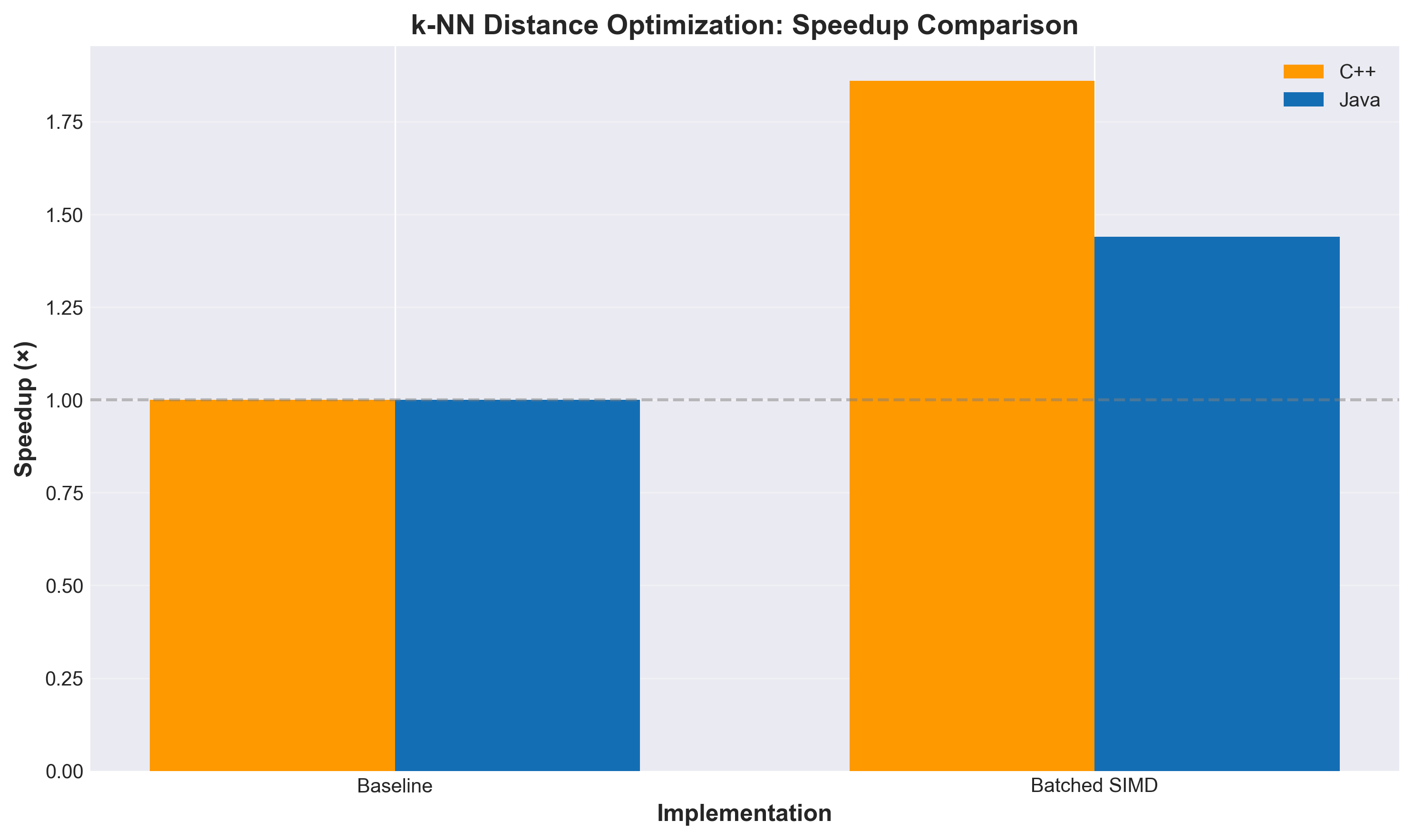
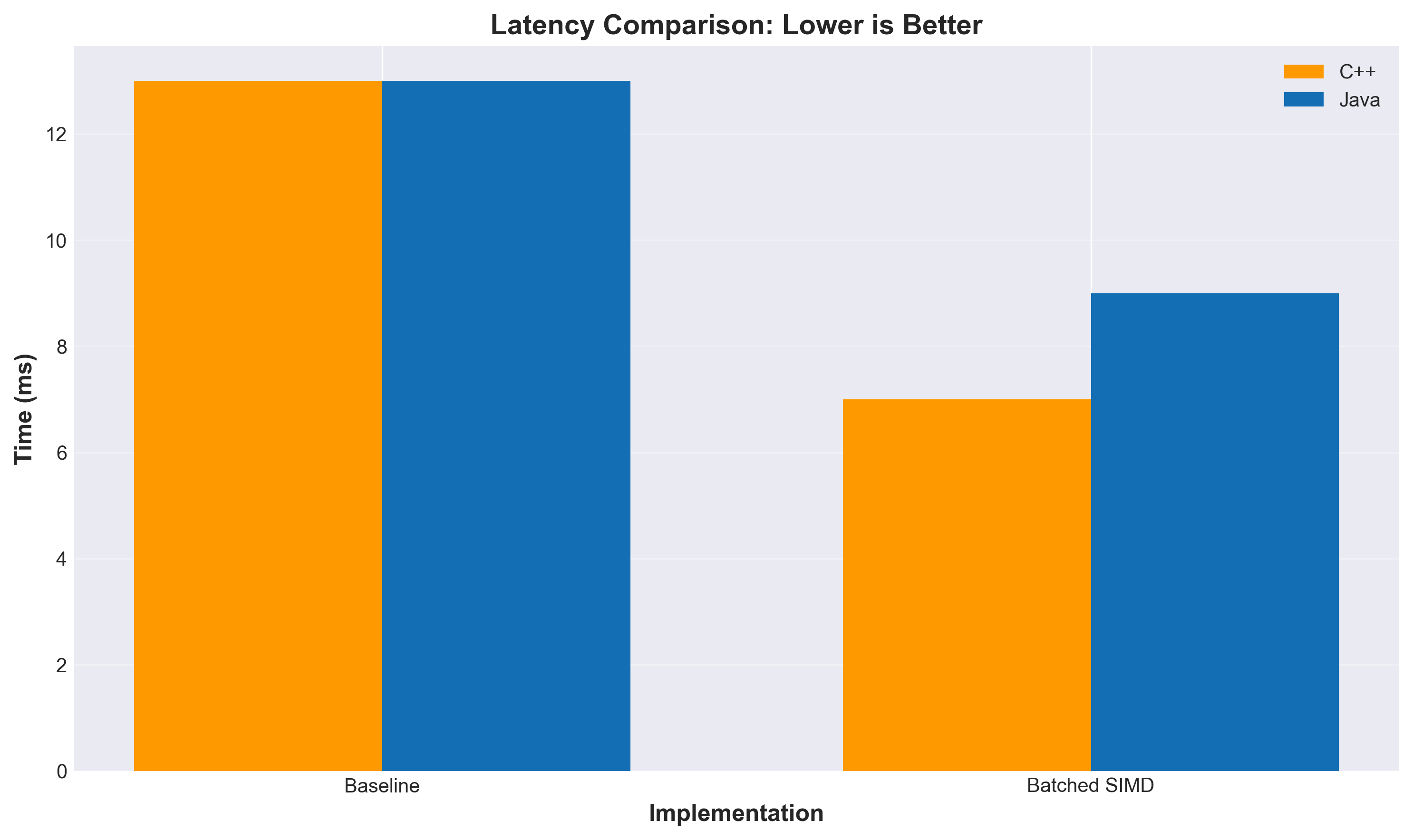
Testing on 100K vectors with top-100 search:
The speedup gets better as dimensionality increases because there’s more opportunity to abort early. At 2048 dimensions, we’re seeing nearly 19× improvement.
k-NN Distance Optimization: Speedup Comparison (Bigger is Better)
k-NN Distance Optimization: Latency Comparison (Lower is Better)
Doing Less vs. Being Faster
There’s a fundamental distinction here that’s worth exploring: this optimization is about doing less work, not doing the same work faster.
When you optimize code with SIMD instructions, better algorithms, or compiler tricks, you’re making the CPU execute the same logical operations more efficiently. You’re still computing all 2048 dimensions—you’re just doing it faster with vector instructions that process multiple values per cycle.
Early abort is different. You’re literally skipping computation. If you abort after 512 dimensions because you can never meet the threshold, you never compute the remaining 1536 dimensions. The work simply doesn’t happen because it is an unnecessary waste.
The Unnecessary Work Problem: Computing Vector Modulus
Before we dive into the interaction with hardware, let’s talk about another form of unnecessary work that plagues vector search implementations: repeatedly computing vector norms.
Where ||x|| is the L2 norm (modulus) of vector x: sqrt(sum(x_i^2)).
Now here’s the thing that drives me absolutely insane: most implementations compute these norms every single time they calculate cosine similarity. Every. Single. Time.
In NMSLIB’s cosine distance implementation, you’ll find code that computes sqrt(sum(x_i^2)) and sqrt(sum(y_i^2)) for every distance calculation. FAISS does the same thing in many of its distance functions—though to their credit, they provide normalize_L2() to pre-normalize vectors, effectively computing and storing the reciprocal of the norm by making ||x|| = 1.
But here’s what kills me: the norm of a vector doesn’t change. If you’re comparing a query vector against 100,000 database vectors, you’re computing the query vector’s norm 100,000 times. The exact same value. Over and over.
Why? Why are we doing this?
Some implementations have separate classes for normalized vs. non-normalized vectors, which is a step in the right direction. But even then, if your vectors aren’t normalized, you’re recomputing norms on every comparison.
Here’s what we should be doing:
Compute the norm once when you first encounter a vector
Pass it around as metadata alongside the vector
Store it on disk with the vector data
Never compute it again
Yes, this costs extra storage—4 whole bytes per vector for a float32 norm. For a million 1536-dimensional vectors, that’s 4MB of additional storage. The vectors themselves are 6GB. We’re talking about 0.07% storage overhead.
In exchange, you eliminate a square root and a number of multiply-add operations equal to the number of dimensions from every single distance calculation. For cosine similarity, you’re cutting the computational cost nearly in half.
And yet, implementation after implementation recomputes norms. It’s maddening.
If you’re building a vector search system and you are continually recomputing norms with your vectors, you’re leaving massive performance on the table. Precompute them. Store them. Pass them around. Treat them as first-class metadata.
This isn’t a clever optimization. This is basic algorithmic hygiene. We should have been doing this from day one. But, thank you, I’ll take credit for it. You heard it here first.
The Interaction with Hardware Acceleration
This gets interesting when you combine early abort with SIMD. Modern CPUs have vector units (AVX-512, ARM NEON, etc.) that can process multiple floating-point operations in parallel. Java’s Panama Vector API exposes this capability in a portable way.
Here’s what happens with pure SIMD optimization:
Without SIMD: Process 2048 scalar operations sequentially
With SIMD (AVX-512): Process 16 floats per instruction, so ~128 vector operations
Speedup: ~8-10× (not quite 16× due to memory bandwidth, instruction overhead, etc.)
Now add early abort on top:
With SIMD + early abort: Process batches of 16 dimensions, check threshold, potentially stop after 512 dimensions
Effective work: ~32 vector operations instead of 128
Combined speedup: ~19× (from doing less work AND doing it faster)
The key insight is that these optimizations multiply, not add. If SIMD gives you 8× and early abort lets you skip 75% of the work, you get 8 × 4 = 32× theoretical speedup (actual results vary due to overhead).
But there’s a cost to early abort: every threshold check introduces a branch, and branch misprediction has a real performance penalty. This is why batch size matters—checking after every 16 dimensions (the SIMD width) balances the benefit of aborting early against the cost of frequent branching. More on this in the branch prediction section below.
Language Runtime Considerations
The implementation language matters more than you might think.
C/C++: You have direct control over SIMD intrinsics and can hand-tune the early abort logic. The compiler won’t reorder your threshold checks or optimize them away. You get predictable performance, but you’re writing platform-specific code.
Java (with Panama Vector API): The JIT compiler is your friend and your enemy. It can optimize hot paths aggressively, but it might also decide to unroll loops in ways that interfere with early abort. The Vector API gives you portable SIMD, but the JIT needs time to warm up and optimize. In production, after JIT warmup, you get near-C++ performance. During startup or with cold code paths, not so much. If you are testing, make sure you warmup.
Python/NumPy: I haven’t looked closely at this but to the best of my understanding, you’re calling into native code (BLAS libraries) for the heavy lifting. Early abort is harder to implement because you lose control once you call into numpy.dot(). You’d need to implement the batched logic in Cython or call into a custom C extension. Whether there will be benefits or not, I’m not really sure.
Branch Prediction and the Cost of Checking
Every time you check if (sum > threshold), you’re introducing a branch. Modern CPUs are good at predicting branches, but they’re not perfect. If the branch is unpredictable (sometimes abort, sometimes continue), you pay a penalty for misprediction—the CPU has to flush its pipeline and restart.
This is why batch size matters. Check too frequently (every dimension), and branch misprediction overhead dominates. Check too infrequently (every 256 dimensions), and you miss opportunities to abort early. Batch size of 16 appears to be a sweet spot—maybe because it aligns with the SIMD width for AVX-512, and it checks often enough to abort early without excessive branching. Your mileage may vary; someone who knows more about CPU microarchitecture should probably opine on the optimal batch size.
Memory Bandwidth vs. Compute
High-dimensional vector operations are often memory-bound, not compute-bound. Loading 2048 floats from RAM takes time, even if the CPU can process them quickly. Early abort helps here too: if you abort after 512 dimensions, you’ve only loaded 2KB instead of 8KB. That’s less pressure on the memory subsystem, better cache utilization, and fewer cache misses.
On modern CPUs with large L3 caches, this matters less for single queries. But when you’re processing thousands of queries concurrently (typical in production), cache pressure is real. Reducing memory footprint per query means more queries fit in cache, which means better overall throughput.
The Threshold Update Dance
The dynamic threshold update adds another layer of complexity. As the search progresses and you find better candidates, you’re constantly updating the threshold. This means:
The threshold check becomes more aggressive over time (more likely to abort early)
Later distance calculations benefit more than earlier ones
The order in which you evaluate candidates matters
In HNSW graphs, you’re traversing the graph in a specific order based on the graph structure. The graph is designed to find good candidates quickly, which means the threshold tightens rapidly in the early stages of search. This is perfect for early abort—by the time you’re deep in the search, most candidates get rejected after just a few batches.
Why 19× and Not More?
You might wonder: if we’re skipping 75% of the work, why not 4× speedup? Why 19×?
The answer is that we’re not uniformly skipping 75% across all candidates. Some candidates are rejected immediately (after 16 dimensions), some after 512, some need the full 2048. The distribution depends on the data and the query.
The 19× speedup at 2048 dimensions suggests we’re aborting very early for most candidates. Back-of-the-envelope: if we’re computing an average of ~100-200 dimensions per candidate instead of 2048, that’s a 10-20× reduction in work. Add SIMD on top, and you get to 19×.
The other factor is overhead. There’s fixed cost per candidate: fetching the vector from memory, setting up the loop, checking the result. Early abort doesn’t eliminate that overhead, it just reduces the variable cost (the actual distance computation).
Implementation Notes
I implemented this in both NMSLIB and Apache Lucene. The NMSLIB implementation (PR #572) was done in C++ and served as the initial proof of concept. The Lucene implementation uses both scalar and SIMD (Panama Vector API) versions. The batched approach works with both, though SIMD gives you additional speedup on top of the early abort optimization.
The tricky part was integrating it cleanly into the existing HNSW search code without breaking backward compatibility. The solution uses a threshold-aware scoring interface that defaults to no-op for similarity functions that don’t support early abort.
A similar change for FAISS is currently in the works.
The Role of AI in This Work
This optimization didn’t spring fully formed from an AI prompt. It came from a lot of manual exploration, experimentation, and learning across multiple languages.
The Manual Discovery Phase
The initial idea came from reading the FAISS and NMSLIB codebases. I’m partial to C/C++, and these libraries have battle-tested implementations of vector search at scale. Studying how they handle distance calculations revealed opportunities for early termination that weren’t being fully exploited.
I started with NMSLIB, implementing the batched early abort in C++, then started playing with Faiss. Then I looked into Rust, then Java. What surprised me was how differently each language and runtime handled the same logical operations.
The scalar implementations performed wildly differently across languages. Java’s JIT compiler made optimization decisions that sometimes helped, sometimes hurt. Rust’s LLVM backend optimized aggressively but predictably. C++ gave me full control but required platform-specific tuning.
The runtime costs of instructions aren’t uniform. A branch misprediction costs more in one context than another. Memory access patterns matter differently depending on cache behavior. SIMD intrinsics have different latencies on different CPUs. Then there’s the complication of testing across hardware: a MacOS laptop with Apple Silicon, another with Intel, and production hardware that has Intel, AMD, and who knows what else. What works optimally on one platform might perform differently on another.
After much hand-tweaking and experimentation, I finally understood the core principles: batch size matters, threshold checking frequency is a tradeoff, and the interaction with SIMD is multiplicative. At that point, I could describe exactly what I needed to an AI assistant.
Enter Kiro
Once I had clarity on the requirements, I started iterating with Kiro. My experience is that initial exploration without AI tools, followed by AI-assisted implementation, is the most effective approach. This is my personal preference – I make no assertions that this is some kind of best practice. It works for me this way …
Correctness is critical. Optimization that produces wrong results is worse than no optimization. Kiro helped me write comprehensive tests—40 unit tests covering edge cases, boundary conditions, and correctness validation across different vector dimensions and similarity functions.
Kiro also reviewed my code and reasoned through the logic. I’d describe the invariants (“batched distance must equal full distance when threshold isn’t exceeded”), and Kiro would validate that the implementation maintained those invariants.
My code was messy. Multiple experiments, commented-out attempts, inconsistent naming, unused variables, debug print statements. The code in the final pull request was cleaned up using Kiro. I didn’t type it all that cleanly—I was focused on making it work correctly first.
Documentation and Communication
Several email correspondences, benchmark analysis, and this blog post were all produced with Kiro’s help. I had the data and the understanding, but translating that into clear communication takes time. Kiro accelerated that process significantly. I could, for example, describe a change in a prompt quite simply and Kiro would quickly perform the change – consistently.
I also use kiro-cli, the command-line interface for Kiro, which integrates directly into my terminal workflow. This blog post itself was cleaned up and polished using Kiro—the initial draft was much rougher, with inconsistent structure and (at times incomprehensible) explanations. Kiro helped simplify the language, tighten the prose and improve the flow.
The key insight: AI tools are force multipliers, not replacements. You need to understand the problem deeply first. Once you do, AI can help you implement faster, test more thoroughly, and communicate more clearly.
Other insight: I don’t like Kiro’s usage of the comma but I don’t want to have the Oxford Comma debate with Kiro – today.
Try It Yourself
I find these optimizations to be effective, but I’m no expert on CPU microarchitectures, the interplay between language compilers and JIT optimizers, memory subsystem behavior, or the countless other factors that impact real-world performance. I’d love your help validating this work and making it better for everyone.
If you’re working with vector search and high-dimensional data, please consider trying these changes. Test them on your workloads, your hardware, your data distributions. Tell me what works and what doesn’t.
A note for those maintaining forks of these libraries: if you don’t regularly pull upstream changes, you might miss optimizations like this. Consider reviewing these PRs and integrating them into your fork if they make sense for your use case.
This is an open call: help me validate that this works across different scenarios. Help identify edge cases I haven’t considered. Help optimize the batch size for different CPU architectures. Let’s make vector search faster for everyone.
Why This Matters
Vector search is everywhere now—semantic search, RAG systems, recommendation engines. These systems often run at massive scale, processing millions of queries. A 10-20× speedup translates directly to lower latency, higher throughput, and reduced infrastructure costs.
And let’s not forget the environmental impact. Less work means less heat, less power consumption, less cooling infrastructure. When you’re running vector search at scale—millions of queries across thousands of servers—a 10-20× reduction in computation translates to real energy savings. The ecological impact could be significant. Making our code more efficient isn’t just about performance and cost; it’s about sustainability.
There’s also the benefit on low powered devices (mobile, Raspberry Pi, …).