
Debugging in the age of AI

Yesterday, Proton Drive on one of my Macs stopped letting me sign in. The app would accept my password and two-factor code, spin for a moment, then show a cryptic message: “Possible decoding error.” That was it. No details, no error code, no suggestion of what to do next.

This wasn’t a minor inconvenience. I’d just returned from a trip where I’d been working on a different Mac, creating numerous documents I needed synced. Proton Drive is central to how I work — losing access to it meant losing access to files I depend on daily. Data loss wasn’t an option, and even temporary inaccessibility was a real problem.
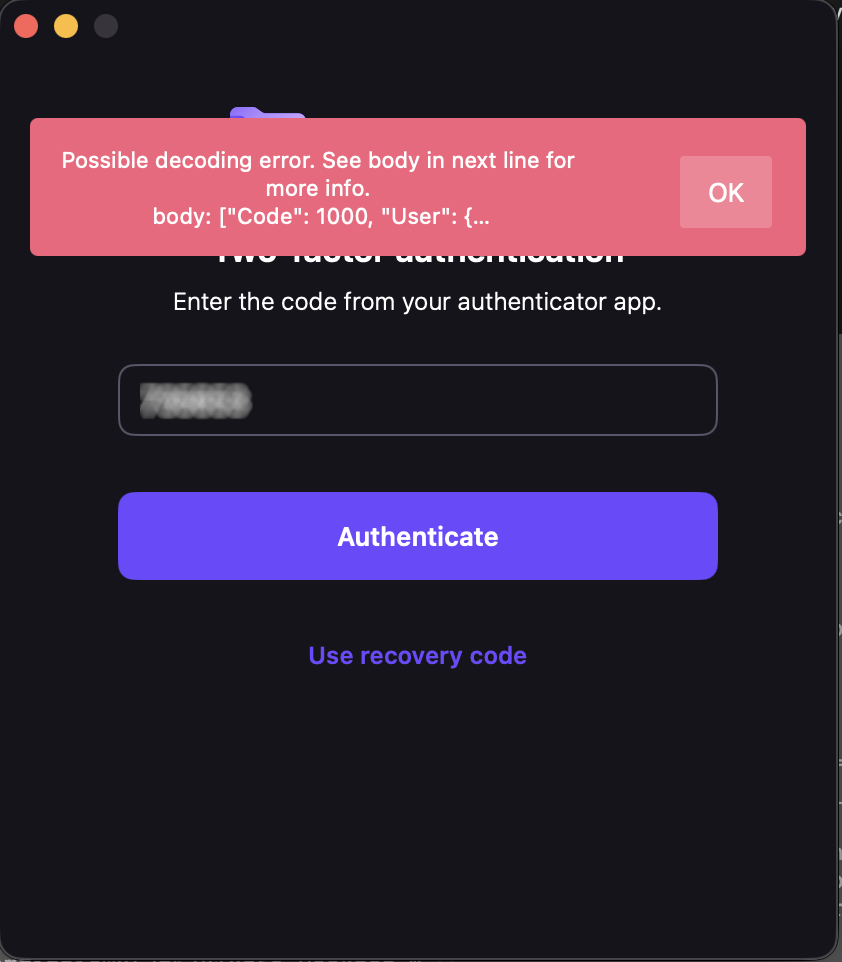
My credentials worked fine in the browser. Proton Mail desktop worked. ProtonVPN worked. Just Drive was broken.

I contacted Proton support and, to their credit, they responded quickly with a cleanup script — a bash script that nukes every Proton Drive file, preference, container, and cache from your system. I ran it. Reinstalled. Same error. I found download links for older versions of the app and tried those too. Same error. I updated macOS from 26.3.1 to 26.4. Same error. I even verified my system clock wasn’t drifting (TOTP codes are time-sensitive) — it was accurate to 8 milliseconds.

At this point I knew two things: the problem was server-side, and support was going to take a while to escalate it. I had another Mac where Drive was still working, but I wasn’t about to sign out and back in on that machine — if the login flow itself was broken, I’d lose access on both.

So I did something that wouldn’t have been possible a few years ago. I asked an AI to help me read the source code.

Open source changes the equation

Proton publishes the source code for their iOS and macOS apps on GitHub. The core networking and authentication library — protoncore_ios — is fully open. This is the code that handles login, token management, API calls, and JSON decoding. The exact code running on my machine was available for anyone to read.

But “available to read” and “practical to read” are very different things. protoncore_ios alone has 44 libraries. The mac-drive repo has another dozen modules. The authentication flow spans multiple files across multiple packages — LoginService, AuthHelper, Session, ProtonMailAPIService, endpoint definitions, credential managers. Tracing a single error message through that stack by hand would take a seasoned Swift developer hours, maybe a full day.

With AI, it took about twenty minutes.

The investigation

I cloned three repos — mac-drive, ios-drive, and protoncore_ios — and pointed the AI at them. I said: find where “Possible decoding error” comes from and trace backward to figure out what’s failing.

It started at the error string in Session.swift line 66 and worked outward. Within minutes it had mapped the full post-login flow: TOTP succeeds → handleValidCredentials()getUserInfo() calls GET /users → response comes back → decoding fails → error surfaces as “Possible decoding error.”

The first theory was a scope/permissions issue — the network logs showed a 401 after successful authentication, which looked like the session token was being rejected. The AI traced the entire retry and token-refresh logic across three files, mapping out exactly how the app handles 401s, refreshes credentials, and retries. That analysis was thorough and correct, but it turned out to be a red herring.

The breakthrough came when I checked the app’s own log file buried in ~/Library/Containers/ch.protonmail.drive/Data/Library/logs.txt. The protoncore networking layer had dumped the full server response into the error message. And there it was:

"Code": 1000

Code 1000 means success. The server had returned a perfectly valid, complete User object. The HTTP request wasn’t failing — the JSON decoding was failing. The error message was, for once, exactly right.

The AI immediately zeroed in on the Flags field in the response:

"Flags": {
    "sso": 0,
    "has-a-byoe-address": 0,
    "has-temporary-password": 0
}

And then looked at the Swift struct that’s supposed to decode it:

public struct UserFlags: Codable, Equatable {
    public let hasBYOEAddress: Bool?
    public let hasTemporaryPassword: Bool?
    public let sso: Bool?
}

The server was sending 0 and 1 — integers. The client expected true and false — booleans. Swift’s Codable protocol does not silently convert between the two. When the decoder hit "sso": 0 and expected a Bool, it threw a DecodingError.typeMismatch, which cascaded up and killed the entire login flow.

That’s it. That was the whole bug. Someone on the server side had changed the Flags response format from booleans to integers, and the Swift client couldn’t parse it.

The fix

Once you know the problem, the fix is almost trivial. A custom decoder on UserFlags that tries Bool first, falls back to Int:

public init(from decoder: Decoder) throws {
    let container = try decoder.container(keyedBy: CodingKeys.self)
    hasBYOEAddress = Self.decodeBool(from: container, key: .hasBYOEAddress)
    hasTemporaryPassword = Self.decodeBool(from: container, key: .hasTemporaryPassword)
    sso = Self.decodeBool(from: container, key: .sso)
}

private static func decodeBool(
    from container: KeyedDecodingContainer<CodingKeys>, key: CodingKeys
) -> Bool? {
    if let value = try? container.decodeIfPresent(Bool.self, forKey: key) {
        return value
    }
    if let intValue = try? container.decodeIfPresent(Int.self, forKey: key) {
        return intValue != 0
    }
    return nil
}

Twenty-three lines. Backward-compatible — if the server goes back to sending booleans, it still works. I committed it, verified it compiled against the ProtonCoreDataModel scheme, generated a patch, and wrote up a GitHub issue with the full root cause analysis.

I also confirmed the bug was present on the develop branch and the latest tag (33.5.1). Nobody had caught it yet.

The punchline

I sent my findings to Proton — the analysis, the patch, the GitHub issue draft. Almost simultaneously, they replied saying they’d found and fixed the problem on their end. They didn’t ship a new client (understandably — spinning a new macOS release is a whole production). Instead, they fixed it server-side. Someone had a conversation with whoever introduced the regression, and the API went back to returning proper booleans.

I can confirm this: the app’s log file on my machine no longer contains any decoding errors or Flags dumps. The login just works now. The server-side fix landed silently, no client update required.

What this is actually about

This isn’t really a story about a type mismatch in a JSON response. It’s about how the relationship between software companies and their users is changing.

Five years ago, if a desktop app broke on login, your options were: contact support, wait, maybe get a workaround, probably wait some more. You were a passive recipient of someone else’s debugging process. The app was a black box. You could describe symptoms, but you couldn’t diagnose.

Today, three things have changed:

Open source makes the code readable. Proton publishes their client source. That’s not just a trust signal — it’s a diagnostic tool. When something breaks, the answer is in the code, available to anyone.

With a caveat. The version of mac-drive I was running (2.10.3) wasn’t published yet — the latest open-source release was 2.10.2. The core library pinned by that release (protoncore_ios 33.2.0) was available and version-matched, which is where the bug lived, so I got lucky. But if the bug had been in the Drive app layer rather than the shared library, I’d have been debugging against stale code. This is a call to action for every company shipping open-source software: if you’re going to open your source, keep it current. A repo that’s two releases behind your shipping binary isn’t really open — it’s a museum exhibit. The whole point of open source as a diagnostic tool breaks down when the code you can read doesn’t match the code that’s running.

AI makes the code understandable. Having access to 44 libraries of Swift code is meaningless if you can’t navigate it. AI can trace an error string through a multi-package call stack, map authentication flows across files, identify type mismatches between server responses and client models, and do it in minutes instead of hours. You don’t need to be a Swift expert. You don’t even need to be a developer. You need to be able to describe what’s wrong and point at the code.

The combination creates a new kind of consumer. Not a passive bug reporter who says “it’s broken, please fix it.” A participant who can say “here’s the exact file, line, and type mismatch causing the failure, here’s a patch, and here’s a ready-to-post issue.” That’s a fundamentally different interaction with a support team.

I want to be clear: Proton’s team found the problem independently and fixed it fast. I’m not claiming I beat them to it. The point is that I could have. A regular user, with no access to Proton’s internal systems, no Swift expertise, and no knowledge of the codebase going in, was able to produce a complete root cause analysis and working patch for a production bug in an afternoon. The AI did the heavy lifting of code navigation and pattern matching. I provided the context — the symptoms, the log files, the intuition about what to check next.

That’s new. And it’s going to keep getting more common.

The broader lesson

If you’re a software company shipping open-source clients: your users are about to get a lot more capable. Bug reports are going to come in with patches attached. Root cause analyses are going to arrive before your own team finishes triaging. This is a good thing — embrace it.

If you’re a user hitting a wall with a broken app: check if the source is open. Clone it. Point an AI at it. You might be surprised how far you get.

And if you’re the person who changed a server API to return 0 instead of false without checking the client contracts — well, I hope the talking-to was gentle. We’ve all been there.


Tools used: Kiro CLI (AI assistant), Xcode 26.4, three open-source Proton repos, one very thorough cleanup script, and a lot of stubbornness.

The GitHub issue: ProtonMail/protoncore_ios#12

FBAR – meet AI

If you are one of those people who recognize the acronym FBAR from personal encounters with it, this blog post will fill your heart with joy.

If you don’t know about FBAR, it is the Report of Foreign Bank and Financial Accounts, a part of Financial Crimes Enforcement Network (FinCEN) – specifically form 114. U.S. persons, including citizens, resident aliens, corporations, partnerships, trusts, and estates, who have a financial interest in or signature authority over foreign financial accounts must file FBAR.

If you’ve never had to do it, take it from me – it sucks. For each account you must report details about the financial institution, the account, the type of account, the highest balance, the date when that highest balance was achieved, the interest or dividends received, all in the foreign currency. Then you convert the foreign currency amount to USD using a magic conversion rate that you must get from the Treasury Reporting Rates of Exchange website. There are also filing thresholds, special rules if you don’t happen to have a magic conversion rate, caveats based on account open and closed dates, and other myriad things that can make any reasonable person want to rip their hair out. Most tax preparers don’t know FBAR and FinCEN and tell you to figure it out yourself (my previous tax preparer was one of these people) and anecdotally many of the major online filing applications don’t prompt you for this as well.

But, you’ll be happy to know that like everything else in the world, AI makes this better. For tax year 2025, I downloaded (in CSV format) transaction records for the past five years from all the financial institutions where I have accounts and dropped them in a directory. Don’t for an instant think that this is easy – some banks I have accounts with seem to be staffed by cavemen.

Then I pointed my AI Agent of choice (kiro) at the the directory full of stuff.

  1. While I asked for CSV, some banks still downloaded as password protected xls.
  2. Each bank has its own statement format – what columns it emits, what headers and footers it provides.
  3. One insists on downloading old information by fiscal year which of course is not necessarily calendar year.

But, no worry. A detailed prompt to kiro made this all a breeze. It was instructive to see kiro reason its way through the whole thing.

  • On the first pass it completely missed an account that was opened in CY 2024 and remains open to this date.
  • On the second pass it found the account that it missed in the first pass but it also provided an account opening date (from CY 2024).
  • On the third pass it realized that the deposit (from the earlier pass) was producing no interest – it was set to only pay interest on maturity. In this pass it computed the interest accrued during the year and recorded it as interest earned.
  • On the fourth pass it computed the interest accrued for this deposit but asked for a clarification – should interest that was not paid be accounted as “earned”?

It took four passes before it came to the point where it was happy with its analysis. It took 7 minutes to finish. It would have taken me a weekend of pure agony, at least.


FBAR Context — General Accounts

What is FBAR

For filing US taxes, a disclosure called FBAR is required for all non-US financial accounts held. One line per account (savings and each FD separately).

Required Fields Per Account

  • Account Number
  • Country of Account Location
  • Highest balance AT ANY POINT OF THE CALENDAR YEAR
  • Date of highest balance
  • Type of account
  • Owner of Account
  • Date Opened (if opened during the calendar year. otherwise blank)
  • Date Closed (if closed during the calendar year. otherwise blank)
  • Interest/Dividends earned during the calendar year

Rules

  1. Calendar year: CY 2025.

  2. Owner: Figure this out from the statements provided. Some accounts are single owner accounts. Others are joint accounts.

  3. Date Opened: Actual date the account was opened. If opened before CY 2025, use the original opening date. Fill only if the account was opened during CY 2025. Leave blank if opened before CY 2025.

  4. Date Closed: Fill only if the account was closed during CY 2025. Leave blank if still open.

  5. Highest balance: The highest balance at any point during CY 2025 (Jan 1 – Dec 31). Include the carrying balance on Jan 1 if no transaction that day.

  6. Currency: All amounts in foreign currency, not converted to USD.

  7. Interest earned: Gross amount credited in CY 2025 for each account. For accounts that provide interest accrual for periods that straddle the calendar year boundary, you will compute the accrued interest for the calendar year by simple daily proration.

  8. One line per savings account, one line per deposit account.

  9. Deposits opened and closed within CY 2025: Include them with both open and closed dates.

  10. Seek clarifications: If you are unsure about something, ask for clarifications. Once you have been able to read all input files, think for a while and make sure that you have all the information you need. DON’T BLINDLY MAKE ASSUMPTIONS, seek clarification(s) instead. You can tell me what you intend to do, and ask me for confirmation.

  11. Verify your work: Once you have been able to read all the input files, and received all the clarifications you need, you will compute the FBAR for CY 2025. You will save this as fbar-cy-2025.txt. Then, you will start all over again with a clean slate and attempt to redo your work. Use the same clarifications from the previous attempt but redo all of your work and save this as fbar-cy-2025-verify.txt. Then you will compare the two. I there is any difference, figure out which is correct and save the correct version as fbar-cy-2025.txt and delete the other file. You will continue to verify and reverify till you reach the point that you find no difference between the two attempts. You will then start fresh and generate fbar-cy-2025-final.txt. If fbar-cy-2025.txt matches fbar-cy-2025-final.txt, you are done. If not, start over.

  12. Input format variance: Different banks have different formats. Don’t assume that two files, either from the same bank, or different banks will have the same format. Treat each file as its own unique snowflake. If you want to normalize the data into some intermediate format, you can do that.

  13. Never combine data across accounts: Each account must have its own reporting. However, your input may show that accounts have relationships. Deposit interest may be credit to the deposit (interest compounding) or credited to a savings or checking account. While you must record the interest earned in the deposit against the deposit account, and the savings account may also earn interest, you don’t account the interest earned on the deposit in the interest earned in the savings account. But, the interest earned on a deposit that gets credited to a savings or checking account does count towards the highest balance in the account.

Input

Provide .csv bank statements. Emit one line per savings account, one line per fixed deposit. For savings accounts, fill the date opened if known. For fixed deposits, the date opened and closed are the dates of opening and closing the deposit. Some banks may provide xls files with the .csv extension. Some even password protect the xls files. Deal with it.


The regenerative AI (r)evolution

Artificial intelligence has been advancing rapidly in recent years and has started to have a significant impact on various industries. Regenerative AI, a type of AI that has the ability to learn from data and generate new data, has the potential to revolutionize the way businesses operate. However, it is also expected to affect the job market, especially for entry-level software development, paralegal, call center, and administrative jobs. The impact of regenerative AI is expected to be felt across the globe, but some geographies are likely to be more impacted than others.

Entry-Level Software Development


Entry-level software development jobs are expected to be impacted across the globe. However, countries such as India, China, and the Philippines, which are currently popular destinations for outsourced software development jobs, may see a more significant impact from regenerative AI. To remain employable in these geographies, entry-level software developers should update their resumes or bios to highlight their problem-solving skills and ability to work collaboratively with others. Additionally, they should consider learning high-level programming languages, such as Python and Ruby, which are less likely to be automated. To market themselves effectively, they should showcase their ability to solve complex problems and their proficiency in programming languages. It’s also important for them to focus on developing their language skills, especially in languages that are in high demand in their particular field.

Paralegal Jobs


Paralegal jobs are expected to be impacted across the globe, but some geographies, such as the United States, may see a more significant impact from regenerative AI. To remain employable in these geographies, paralegals should update their resumes or bios to highlight their problem-solving skills, as well as their ability to work collaboratively with others. Additionally, they should consider developing expertise in niche areas of law, such as intellectual property law or international law, which are less likely to be automated. To market themselves effectively, they should highlight their legal knowledge and expertise in niche areas of law. Paralegals can also focus on developing their language skills in multiple languages, which can be an important asset when working with clients or international colleagues.

Call Center Jobs


Call center jobs are expected to be impacted across the globe, including in countries where call centers are outsourced, such as India and the Philippines. However, English-speaking countries such as the United States, the United Kingdom, and Australia, may see a more significant impact from regenerative AI. To remain employable in these geographies, call center employees should update their resumes or bios to highlight their problem-solving skills, as well as their ability to provide exceptional customer service. Additionally, they should consider learning new technologies, such as chatbots and artificial intelligence, which are likely to play a significant role in the future of customer service. To market themselves effectively, they should showcase their ability to provide excellent customer service and their proficiency in new technologies. Call center employees can also focus on developing their language skills in multiple languages, including English, to better serve a diverse customer base.

Administrative Jobs


Administrative jobs are expected to be impacted across the globe. However, countries such as India, China, and the Philippines, which are currently popular destinations for outsourced administrative jobs, may see a more significant impact from regenerative AI. To remain employable in these geographies, administrative employees should update their resumes or bios to highlight their problem-solving skills, as well as their ability to work collaboratively with others. Additionally, they should consider learning new technologies, such as cloud-based systems and project management tools, which are likely to become more prevalent in the future. To market themselves effectively, they should showcase their proficiency in these technologies and their ability to manage projects efficiently. Administrative employees can also focus on developing their language skills in multiple languages, which can be an important asset when working with international colleagues or clients.

In conclusion, the impact of regenerative AI on entry-level software development, paralegal, call center, and administrative jobs is expected to be felt across the globe, with some geographies likely to be more impacted than others. To remain employable in these fields, students and young people should focus on developing their problem-solving skills, ability to work collaboratively, and proficiency in new technologies. Additionally, language skills can be a differentiating factor, especially in English-speaking countries where call center jobs are commonly outsourced. By updating their resumes or bios to highlight these skills and marketing themselves effectively, students and young people can position themselves for success in the job market, even in the face of rapidly advancing AI technologies.

P.S. Blog writing will also be severely impacted by regenerative AI.