How to Make Fake Shallow Depth of Field Using Photoshop
https://digital-photography-school.com/make-fake-shallow-depth-of-field-using-photoshop/

How to Make Fake Shallow Depth of Field Using Photoshop
https://digital-photography-school.com/make-fake-shallow-depth-of-field-using-photoshop/
I have long suspected that this was the case, especially when no one could give a simple explanation why we did this.
Those are just some of the explanations I have heard.
But I get it, in countries that are wide (west to east) you need more time zones. That is the real solution.
The developer’s dilemma
A nice, thought provoking article by @nayafia
https://medium.com/@nayafia/the-developers-dilemma-eda85a8dc663
This article appeared almost a month ago, and I just got to reading it. It almost looks like it was written looking in the rear view mirror! Are there any of these seven trends that isn’t already a hot topic?
7 #Cloud Computing Trends to Watch in 2018
Some very good introductory material about TensorFlow
Source: Tips for Photographing Your First Hot Air Balloon Festival
The article also provides a useful link to hot air balloon festivals near you, that link is: http://www.hotairballoon.com/
Excellent article about some research at Northeastern University.
Similar location leaks also reported in a number of recent articles related to fitness trackers.
Now, that’s easy to say.
But, blockchain today is what docker was 18 months ago.
Startups got funded for doing “Docker for sandwiches”, or “Docker for underpants” (not really, but bloody close).
Talks were accepted at conferences because of the title “Docker, Docker, Docker, Docker, Docker” (really).
And today it is blockchain.
https://www.coindesk.com/dont-use-blockchain-unless-really-need-one/
Google’s Project Fi international data service goes down.
One of the things I have come to realize is that it is not a good plan to depend on services provided by the likes of Google.
They work 99.9 or 99.95% of the time. And they work well. But depend on them for five 9’s, that’s dumb.
https://www.engadget.com/amp/2018/01/13/google-project-fi-international-data-outage/
Cold weather is the best time to look at—and photograph—the night sky
I happened to be at the Mysore School of Architecture, in Mysore, India and had a chance to walk around. And click some photographs 🙂  The building is bright and airy, and the pictures below show some views of this.

 There was a lot of art all around the campus, all of it created by the students. Some modern art under the stairs.
  Modern art in the courtyard.
  A nice painting which shows two views, depending on where you stand.

 A nice mural on the wall.
  Some lovely photos; the sun and the wind weathered the display, but the display and the captions are lovely.
 Many of the class rooms have nice caricatures of famous architects.

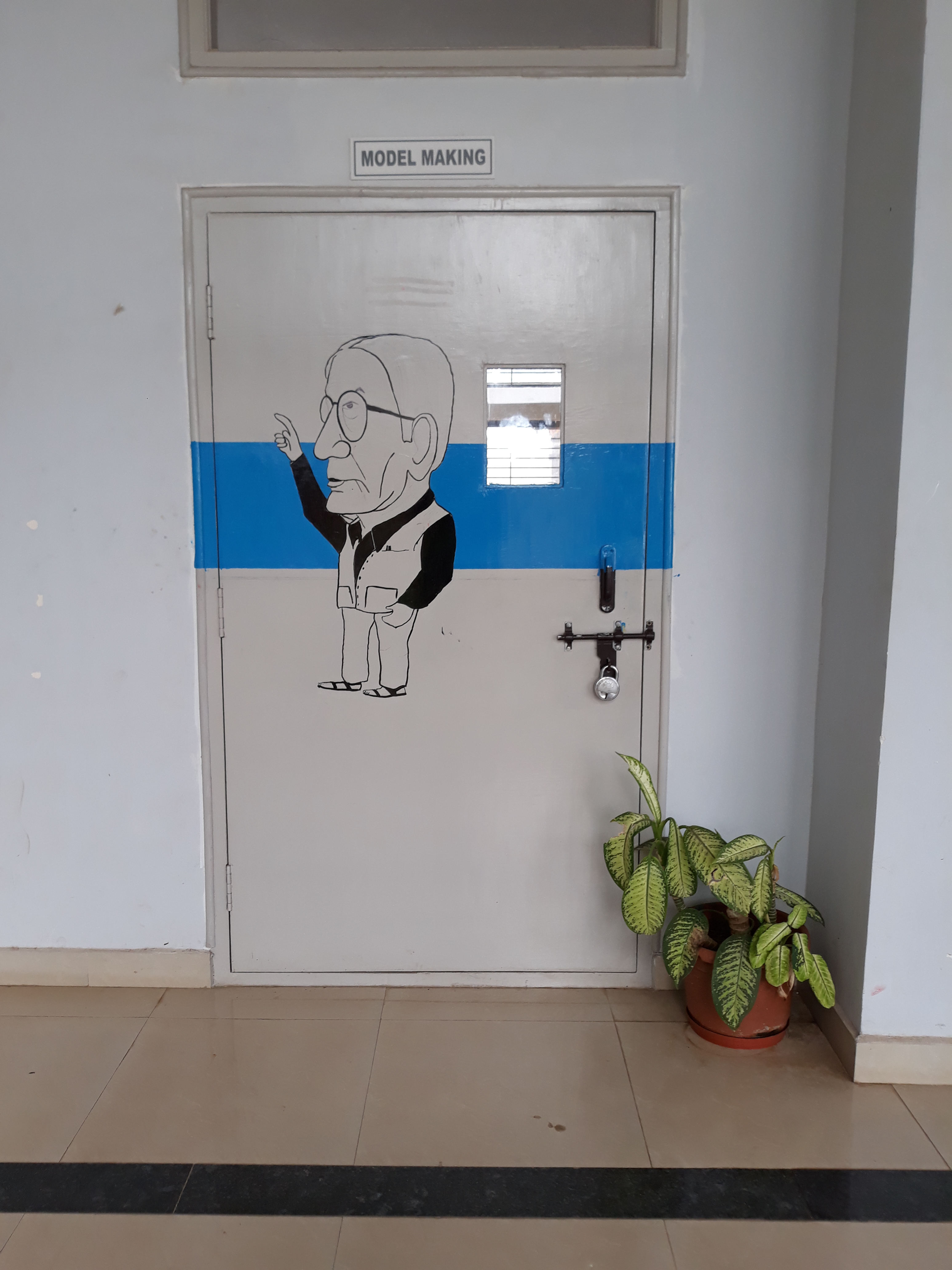

 And finally, some lovely origami under the stairs!
  I loved my short trip to the college and will surely be back when there are some students there.
Ten quick tips for photographing northern lights.
I would love to do this sometime.
https://www.diyphotography.net/ten-quick-tips-photographing-northern-lights/
A great article on the subject of hyperfocal distance.
https://www.nikonians.org/reviews/dof-and-hyperfocal-distance-tables-and-calculator/p/all
The basic idea is that if you focus your camera at the hyperfocal distance (H), the depth of field is from H/2 to infinity.
After the eclipse, I’m sure that everyone will have a welding glass to try this with!
http://www.diyphotography.net/use-welding-glass-as-10-stops-nd-filter/
A couple of months ago, a former co-worker called me and asked if I would provide a reference for her in a job search (which I readily agreed to). Then she went on to ask me this, “This company wants to make me an offer and they called and asked me what I currently make, and asked for a copy of a paystub. What should I do?”
Personally, I find this question stupid. I’ve been asked it many times (including quite recently) and in all instances I’ve been surprised by it (doh!) and I’ve answered in what I now consider to be the wrong way.
Every hiring manager has a range of salaries that they are willing to pay for a position, and they have a range of bonuses, a range of stock options and other incentives. And then there’s the common incentives that everyone gets (401(k), vacation, …). So why even ask the question? Why not make an offer that makes sense and be done with it?
If you are a hiring manager / HR person on the hiring side, do you ask this question?
If you are a candidate, how do you handle this question?
In any event, here’s what I recommended to my friend, answer the question along these lines.
That’s it. When asked for a copy of current pay-stub or anything like that, I recommend that you simply decline to provide it and make it clear that this is not any of their business.
Now, whether one can get away with this answer or not depends on how strong your position is for the opening in question. Some companies have a ‘policy’ that they need this paystub/W-2 stuff.
Not providing last pay information and following their ‘process’ could make the crabby HR person label you ‘not a team player’ or some such bogus thing and put your resume in the ‘special inbox’ which is marked ‘Basura’.
In any event, this all was fine and my friend told me that she was given a good offer which she accepted.
How do you approach this question?
The article makes a very simple argument for something that I have felt for a while, block chain is a cool technology but the majority of the use cases people talk about are just bull shit.
Yesterday it was announced that Tesora had been acquired by Stratoscale, here are some of the articles that were published about this.
and this official announcement by Stratoscale
Thanks to all of you who emailed, texted, tweeted, called, and pinged me on IRC 🙂 I’m overwhelmed by the volume and all the good wishes. I’ll reply to each of you individually, sorry it may take a couple of days for me to do that.
To all of our investors and advisors, first in ParElastic and later in Tesora, thank you all for your help and support. To everyone at Tesora who is moving to Stratoscale, all the very best to you. It has truly been a wonderful six years working with you and I thoroughly enjoyed it.
Doug: It’s been especially awesome working with you these past six years. You are a great leader of people, and you have built and managed a truly exceptional team. People in your team like you, respect you, are comfortable approaching you with the strangest questions, and are willing to work with you over and over again. Not an easy thing to pull off over the extraordinarily long period that you’ve been able to do this. You were clearly not an easy taskmaster and your team consistently delivered miracles. But along the way you managed to ensure that everyone was having a good time.
Ken: No entrepreneur can have hoped for a better partner than you. It has been an extraordinary ride and it has been truly my honor and privilege to have taken this ride along with you. I think you were instrumental in building a company which was a very special place to work, where we built some excellent technology, got some marquee customers, and had a lot of fun doing it. I’ve learned a lot, about startups, about technology, about business, and about myself; thank you very much for this awesome experience.
Several of you have asked me “what’s next for Amrith”. I don’t know yet, I’m trying to figure that out (thanks to all of you who have offered to help me figure this out, I will certainly take you up on that).
In the short term, I’m going to continue to work on Trove, finish up my term as the PTL for Ocata and continue to work on the project as we begin the Pike cycle.
What comes later, I have no idea but if you have ideas, I’m all ears.
I purchased an Acurite 10 sensor indoor humidity and temperature monitoring system and am surprisingly happy with it. I was expecting a generally crappy experience but I have to say I was wrong, and it wasn’t that I’d set my expectations so low; the system is truly quite good.
The system I purchased is this one.
You get a smartHub and 10 sensors. Pictured below is the hub and a sensor.


The smartHub comes with a little power adapter and an ethernet cable. Stick it into a wall outlet and connect the ethernet cable to your router and DHCP does its thing and the smartHub gets online.
It initiates a series of accesses to some locations and downloads firmware and the like. (I’ve captured network traces, if I find anything interesting, I’ll blog about that). In a couple of minutes the lights stabilize and you have to press a button that says “Activate”.
Then you create an online account at the Acruite site and once you are logged in, you associate your account with the device. You identify it by the number on the bottom (spoiler alert, the number is the MAC address of the device).
Within about a minute, the device shows up and you are good to go for the next step.
Each sensor takes two AAA batteries, pop them in and within a minute the web portal shows a new device which you can rename and mount wherever you want it. Very slick and easy.
Within about 15 minutes I had 10 sensors online and reporting.
I was so happy with this that I’ve purchased another smartHub and 10 more indoor/outdoor sensors; they don’t have the LCD display.
OK, so what did I not like?
Acurite strikes me as a company that makes fine hardware and they appear to have done an absolutely bang up job on the initial setup and “getting started” part of the experience.
They are not a software company. The software part of the “after setup” experience is kind of horrible.
They offer no easy API based mechanism to retrieve your sensor data. Yes, on the web app, you can click a couple of buttons and play with date controls and get a link to some AWS S3 bucket mailed to you with your data as a CSV but really, advertise an API, get someone to write an IFTTT channel, then you’ll be cooking with gas.
Next post will be a deconstruction of the protocol, what you get when you point your web browser at the smartHub’s IP address, and those kinds of fun things.
The people at Acurite Support are wonderful. I have (in the past three days) spoken with two of them, and interacted with one via email. The people I spoke with were knowledgeable, and very helpful.
The wait times on hold are quite bad. I waited 25 minutes and 15 minutes respectively on hold. There is the usual boring elevator music while you stay in line with an announcement every minute that you are “XX in line”. No indication of how long your wait will be but you are offered the option of getting a callback.
An odd thing though is that while I was in line and I heard the message “you are second in line” a couple of times, I suddenly ended up being “third in line”. How someone got ahead of me in line, I know not.
But, their support is great. 5 stars for that!
Amazon’s demented plans for its warehouse blimp with drone fleet http://arstechnica.com/information-technology/2016/12/amazons-demented-plans-for-its-warehouse-blimp-with-drone-fleet/?amp=1
Shit like this is what gives patents a bad name!
President Signs Law Protecting Your Right to Review https://www.eff.org/deeplinks/2016/12/president-signs-law-protecting-right-review
I did not know that companies could (and had been) doing this.
In March 2012 (that’s a while ago) I wrote this article about a new service I’d discovered called IF-This-Then-That.
Now, almost five years on, IFTTT has come a long way. Just looking at the channels (they now call them services) it is amazing how far they’ve come. Quite amazing.
Time to go revisit IFTTT. It still amazes me that they are a free service.
Interesting article in MIT Technology review at https://www.technologyreview.com/s/603198/facebook-at-a-crossroads/.
More than half of the 3.4 billion people with Internet access log on to Facebook each month. Revenue in the first nine months of 2016 jumped 36 percent to $19 billion; profit nearly tripled, to $6 billion. Yet the company’s founder has spent the year talking up his plans to become something much larger and more meaningful.
With the election now over, the coming crackdown on fake news, and getting mired in the censorship controversy after blocking the video stream of Philando Castile after he was shot in Minnesota surely didn’t help.
I wonder how much all these things will affect Facebook, and how much that is driving the urge to do unnatural things.
Drones, Virtual Reality, get a grip …
When I read I’m throwing in the towel on PGP, and I work in security, which appeared as an Op-ed in ArsTechnica, I felt that it certainly deserved a response. While makes some valid points about PGP/GPG, I felt that they were less about shortcomings in the scheme and rather usability issues that have been unfortunately ignored.
Then I read “Why I’m not giving up on PGP“, an excellent article, also in ArsTechnica, and it does a much better job of refuting the article than I could ever have done.
Both are well worth the read.
It is being widely reported that the FAA has issued an Airworthiness Directive (AD) requiring that Boeing 787 Dreamliners must be rebooted every 21 or so days.
This is not a hoax.
This is the AD issued by the FAA 0n 2016-09-24, I obtained a copy of this AD from here.
The AD states:
This AD requires repetitive cycling of either the airplane electrical power or the power to the three flight control modules (FCMs). This AD was prompted by a report indicating that all three FCMs might simultaneously reset if continuously powered on for 22 days. We are issuing this AD to address the unsafe condition on these products.
This condition is caused by a software counter internal to the GCUs that will overflow after 248 days of continuous power.
I’ve long wanted a simple explanation of the Monty Hall problem and I’ve never found one that I liked. Some I really detested like one that tried to make some lame analogy to baseball pitchers.
Anyway, here is what I’ve found to be the simplest explanation yet. First, what’s the problem.
In a game show, the contestant is shown into a room with three identical closed doors. He is informed that behind one door is a prize and behind the other two doors, there is nothing.
He is then asked to pick a door. Once he has picked a door, the host proceeds to open one of the other two doors (that he had not picked) and shows the contestant that there is nothing behind that door.
The host then offers the contestant the option of either changing his selection (picking the third remaining door), or sticking with his initial choice.
What should the contestant do?
The simplistic answer is that once the contestant has been shown that there is nothing behind one door, the problem reduces to two doors and therefore the odds are 50-50 and the contestant has no motivation to switch.
In reality, this is not the case, and the contestant would be wise to switch. Here is why.
 Three doors, behind one of them is the prize, behind the other two, there is nothing.
The contestant now picks a door. For the purposes of this illustration, let’s assume that the contestant picks the door in the middle as shown below.
 Since the prize is behind one of the three doors, the odds that the prize is behind the door that the contestant has picked is 1/3. By extension therefore the probability that it is behind one of the other two doors is 2/3 (1/3 for each of the doors).
So far, we’re all likely on solid footing, so let’s now bring in the twist. The game show host can always find a door behind which there is nothing. And as shown below, he does.
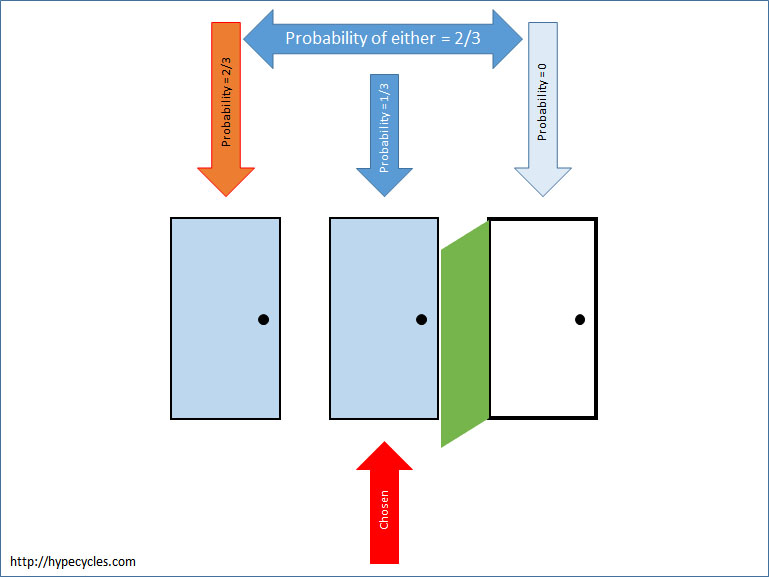 The game show host has picked the third door and there’s nothing there.
However, nothing has changed the fact that the probability that the prize was behind the door that the contestant chose is 1/3 and the probability that it is behind one of the other two doors is 2/3. What has changed is that the host has revealed that it is not behind the door at the far right. If then the probability that it is behind the far left door and the far right door (the two doors that the contestant did not pick) is 2/3, we can say that the probability that it is behind the far left door has to be 2/3.
With this new information therefore, the contestant would be wise to switch his choice.
This article first appeared at http://www.tesora.com/defining-success-in-openstack/
I recently read Thierry Carrez’s blog post where he references a post by Ed Leafe. Both reminded me that in the midst of all this hand wringing about whether the Big Tent was good or bad, at fault or not at fault, and whether companies were gaming the system (or not), the much bigger issue is being ignored.
We don’t incentivize people and organizations to do the things that will make OpenStack successful, and this shortcoming poses a real and existential threat to OpenStack.
Werner Heisenberg observed that the act of measuring the position of a sub-atomic particle affected its momentum and vice-versa. In exactly the same way(s) that Heisenberg said, the act of measuring an individuals (or organizations) performance in some area impacts that performance itself.
By measuring commits, lines of code, reviews and other such metrics that are not really measures of OpenStack’s success, we are effectively causing individuals and organizations to do the things that make them appear “good” on those metrics. They aren’t “gaming the system”, they are trying to look good on the measures that you have established for “success”.
At Tesora, we have always had a single-minded focus on a single project: Trove. We entered OpenStack as the DBaaS company, and have remained true to that. All the changes we have submitted to OpenStack, and the reviews and participation by Tesora have been focused on the advancement of DBaaS. We have contributed code, documentation, tests, and reviews that have helped improve Trove. To us, this single minded focus is a good thing because it has helped us advance the project, and to make it easier for people to deploy and use it in practice. And to us, that is the only thing that really matters.
The same thing(s) are, true for all of OpenStack. Actual adoption is all that matters. What we need from the Technical Committee and the community at large is a concerted effort to drive adoption, and to make it easier for prospects to deploy and bring into production, a cloud based on OpenStack. And while I am a core-reviewer, and I am the Trove PTL, and I wrote a book about Trove, and our sales and marketing team do mention that in customer engagements, we do that only because they are the “currency” in OpenStack. To us, the only things that really matter are ease-of-use, adoption, a superlative user experience, and a feature rich product. Without that, all this talk about contribution, and the number of cores and PTL’s is as completely meaningless as whether the Big Tent approach resulted in a loss of focus in OpenStack.
But, remember Heisenberg! Knowing that what one measures changes how people act means that it would be wise for the Technical Committee to take the leadership in defining success in terms of things that are surrogates for ease of installation, ease of deployment, the number of actual deployments, and things that would truly indicate the success of OpenStack.
Let’s stop wasting time defending the Big Tent. It was done for good reasons, it had consequences. Realize what these consequences are, perceive the reality, and act accordingly.
These days everyone knows someone whose computer was hacked; everyone has heard of others who have been hit by ransomware, and who have suffered significant losses as a result. The losses are sometimes financial, but often they are non-monetary, like losing all family photographs, music, files, and so on.
While it is not possible to entirely prevent these kinds of things, there are some easy steps that we can all take to considerably minimize the likelihood of this kind of thing. It is however equally the case that the majority of these things also make it a little harder to use our computers, and this is by design.
The primary reason why people fall victim to these attacks is complacency, or letting one’s guard down for just a moment. The simple tips below try to prevent that by making it just a little bit harder for you do yourself harm in this way. So here are some tips that I believe we can all take to improve our computers security. I write them from the perspective of a Windows user; if you are a user of a Mac, similar things apply to you but I don’t use a Mac so I don’t know what they are. And, if you are one of those few Linux users, you are likely a nerd anyway and probably can figure this stuff out for yourself.
There used to be a time when the #1 way to make Windows computers safer was to move to a Mac. That is unfortunately not true any longer. Macs are also vulnerable to many of the exploits that we see these days.
One of the horrible things that Windows does on initial installation is to ask you for your name, and setup an account for you. And it makes that user an Administrator. In my experience, most home computer users regularly login using that account.
When setting up a computer, always create a user who will be an administrator, and after the computer is setup, create a regular user who is a standard user. It should look something like this when you look at the users settings.
If the account(s) that are commonly used on your computer are Administrators, do this:
What have you accomplished here?
By making all common users Standard Users, you have made it harder for exploits which typically require Administrator privilege to, well, exploit.
When someone wants to install software, make changes to your computer, and so on they will need to be the Administrator, and will need the password to the “MyComputerAdministratorDingDong” account. This does make it mildly harder to use the computer, but it is a worthwhile safeguard.
Over time, computers accumulate cruft. And if your computer wasn’t secured as described above, you are likely to find lots of cruft. Uninstall anything that you don’t recognize, or don’t use now.
What have you accomplished here?
In addition to potentially making your computer quicker, you have also removed all potentially suspicious software from your machine. Should you need one of them later, you can certainly add it back.
It is amazing that this is still something one has to list. Most ISP’s offer Anti-Virus free, download and install one. If your ISP doesn’t purchase one and install it.
Windows 8 and 10 come with Defender. In my experience they are not quite as good as commercial Anti-Virus software packages. While Defender is free, it is worth getting something else at this stage; maybe someday soon Defender will be better.
What have you accomplished here?
Anti-virus software is an essential part of your protection plan. Make sure you have one; and Windows Defender isn’t (today) the answer.
This should be self-explanatory but passwords like “password”, “homewifi”, and “xfinity” are just too easy to guess! Make it something that is hard to pronounce, uses numbers and punctuation.
My preference is to make it something obscene, that way you won’t be yelling it out to people you meet.
That last thing is something I advocate for all passwords, make them words that you will not utter in public; does wonders for password security.
What have you accomplished here?
Getting on a network with other computers is one of the ways in which a bad actor could infect your computers. By making it harder to get on your network, you have added a layer of protection to your network.
Most households with more than one computer likely share a homegroup and share files, music, and pictures on the homegroup.
If you are not able to secure a computer (as described above) kick that computer off your homegroup, move them to a Guest WiFi network.
So, what do I do about my internet connected TV’s, phones, and other devices which I can’t secure in this way. You could do one of two things, either get another cheap WiFi access point for those, or put them on the Guest WiFi network as well.
What have you accomplished here?
Your homegroup should be a safe space. By eliminating all potentially unsafe actors from the homegroup, you have improved the level of safety there.
Phishing, link highjacking, and numerous other nasty things that cause harm to your computer are caused by clicking on links. So if you receive email that includes links, buttons, and other calls to action, think before you click. Hovering over a link or a button will typically reveal what the action will be.
There is no easy way to tell someone how to recognize a fake email message; scammers are quite sophisticated these days. So just be safe and don’t click on things unless you are really sure you know what you are doing.
But, you can remember these simple tips:
What have you accomplished here?
Many exploits require you to take an action that triggers the installation of the bad software. By taking these steps, you have made it harder for this to happen.
Web browsers and email clients allow you to set these privacy options. And they are well worth setting.
Search for directions for your specific browser and email client and make these changes.
What have you accomplished here?
Many exploits require you to take an action that triggers the installation of the bad software. Automatic downloads and infection buried in some image file formats are one way in which bad actors get around this. By taking the steps described here, you have made it harder for this to happen.
This is particularly important for laptops and computers in shared areas. Enable a timeout and a lock screen. When you step away from the keyboard, lock the computer (Windows Key-L). Require a password to unlock the computer.
What have you accomplished here?
An unlocked computer is an invitation for someone to meddle. A locked computer (with a good password) is significantly harder for one to damage.
One of the most common sources of malware, viruses, and other nasty stuff is shared USB drives. Disabling autoplay along with the steps above can significantly improve the security of your machine.
If you are given a USB drive, consider the source carefully. I prefer to just say “No” and ask people to email the document(s) to me, or to put them on a shared drive like Dropbox.
What have you accomplished here?
Recently a new breed of exploits merely require someone to plug in a rogue USB stick into your machine and the malware gets automatically installed because of autoplay. By disabling autoplay, you make this harder (not impossible).
And if you want to be truly sure, here’s what I do with my laptop when I travel. Reboot the machine to BIOS and disable the USB ports.
That way, when the friendly gentleman comes along and gives you a document on a USB stick, you can safely say it doesn’t work (then blame your IT department for it). If the person insists that he can fix it, you are still safe because no matter how much he jiggles the USB stick in the port, it won’t work.
On one occasion, a particularly persistent (read: pesky) individual said he knew what was wrong, that the port was disabled in the BIOS. And he went to reboot the computer to BIOS and sure enough “My IT Department” had set a password on that and damn them because I don’t know what it is.
What have you accomplished here?
Similar to the earlier step, you make it much harder for bad actors to infect your computer using the USB port as the attack vector.
As you can likely see, each of these steps will make it just a little bit harder to use, and enjoy your computer. But as the adage goes, “no pain, no gain”.
https://www.raspberrypi.org/blog/meter-maid-monitor-parking-protection-pi/
This is just brilliant. I think only good things can come from this.
Lintel Technologies: Python: new magic method explained
See: http://howto.lintel.in/python-new-magic-method-explained/
How To Build Your Own NAS From Scratch (With Parts List!)
A very nicely written article with some clear advice.
http://digital-photography-school.com/preparing-images-print-display/
In May 2015, I wrote about the risks of handing out your email address and making a mistake. (That post appeared on facebook at the time).
Well, it appears that the person handing out my gmail address isn’t just one person; we now have a second.
Someone handed out my email address and applied for life insurance. And the agent promptly emailed the entire application packet to me!
This time, it had a phone number so I called the guy. After explaining (what seemed like an eternity) that I had his application packet, I asked him what his email address was.
His answer “amrith something dot com”.
Oh boy!
Google-Funded Free Wi-Fi Kiosks Are Scrapping Web Browsing Because Too Many People Were Using it For Porn
Really? They can’t put simple Web filtering in place? This is lame.
A Teenage Hacker Figured Out How To Get Free Data On His Phone. Awesome!
When I resurrected this blog, I lamented the loss of history and old posts from the time when this blog was hypecycles.wordpress.com and pizzaandcode.com.
Well, thanks to the wonders of the internet (and help from my friend Daniel Senie) I was able to recover all of the old posts and add them back to this blog!
History going all the way back to sometime in 2009 is now back online.
Really? Uber for your kitchen? Will they be regulated like restaurants?
VizEat, a startup that lets you dine in a local’s own home, gobbles up €3.8M funding https://techcrunch.com/2016/09/06/vizeat/amp/
SETI has observed a “strong” signal that may originate from a Sun-like star
Continue reading “SETI has observed a “strong” signal that may originate from a Sun-like star”
VMware says, “We’re not dead,” updates Fusion and Workstation for free
Enlarge /VMware Fusion 8.5 for Mac, with tab support.
Continue reading “VMware says, “We’re not dead,” updates Fusion and Workstation for free”
See an update to the content of this post at https://hypecycles.com/2016/09/14/memory-regained/
This isn’t my ‘new’ blog.
This blog actually started in ~2009 (it was https://hypecycles.wordpress.com at that time). The page history on the “about” page indicates that it was about July 2009. For several years, it was quite active; through about 2012 when I moved it to a different hosting location and it was then called http://pizzaandcode.com.
Then, it went mostly dormant and about a year ago I shut it down. Unfortunately at that point, I didn’t bother to save the old posts and things so all of that is gone.

I use a service from statcounter.com and that has enabled me to go back and look at some of this history. I enabled statcounter in ~October 2009 on hypecycles.wordpress.com and the graph below shows daily traffic to the sites over time (through today).
So, in a sense this is the rebirth of an old blog. With a new URL (http://hypecycles.com).
About three years ago I received an email from the large Indian Cell phone provider AIRTEL with the subject “Your airtel Bill for airtel number: 0444*******”. Now, I don’t have an AIRTEL phone number, and I figured this was odd but it looked like a real bill. I still have the email, billing period 11/4 to 10/5/2012. And that was the start of my saga.
It said my airtel ebill was protected with a unique password and all that so I couldn’t do much so I ignored it.
But I called the number and spoke with some dude. His name is also Amrith. And I told him that he must have accidentally given Airtel my email address so would he please fix it. He muttered something and hung up.
Shortly thereafter I received email from ICICI with a life insurance policy for “BEENA P”. There was some link which took me to their online site and I’d have to login and register and stuff which I didn’t have any way of doing.
Over the past three years I have received numerous emails from Airtel asking for payment on the landline which I replied to and said I wasn’t the person. Later I replied and said they should cancel the telephone line. They sent me email saying they were sorry to see me go. I called Airtel support and told them what was up and the dweeb I spoke with couldn’t figure out what to do with me so they said they’d email the customer. And yes, I got that email.
Over the years, I have canceled the phone service numerous times, it gets reactivated. I have received numerous statements for Beena’s insurance policy but now they send encrypted PDF’s with a password. The password is the first four letters of Beena’s name (BEEN) presumably and the date of birth as DDMM. OK, I’m bored but not that bored and I didn’t have the patience to try the 366 possible combinations to figure out what the right one was so I ignored it.
And each time this dipshit gives ICICI and Airtel my email address.
Today I got an email from ICICI wishing Beena P a happy birthday!
Would someone who knows someone at ICICI who has a slightly non-trivial job title please put me in touch with that person?
Oh, the PDFs which are all sitting in my GMAIL (we all know google never deletes anything) contain a policy number and all you need to create an online profile with ICICI is a policy number and a date of birth.
Tech Blogger Tries To Cancel Comcast Service, Hilarity Ensues http://feedproxy.google.com/~r/Techcrunch/~3/gesTdo0aLkY/
Wow. I’m going to try this as well.
Texas Town Turns To Treated Sewage For Drinking Water
http://rss.slashdot.org/~r/Slashdot/slashdot/~3/sfkixCAeC7c/story01.htm
Not a very high bar …
“He said there have been few complaints so far. A glass of the finished product, sampled at a downtown restaurant, tasted about average for West Texas.”
Want To Ensure Your Personal Android Data Is Truly Wiped? Turn On Encryption http://rss.slashdot.org/~r/Slashdot/slashdot/~3/HzbWPjzSHKE/story01.htm
Surprisingly simple.
What with things like HeartBleed, keyloggers and other exploits that are possible on your machine, web browsing is inherently risk prone. When you choose to do something like “Online Banking”, you just brought these risks very close to your money. So you had things like passwords to keep you safe.
So here’s where I think Banks are going stupid, or they are being advised by imbeciles.
My bank:
They are changing this as follows:
In the old way of doing things, I effectively had four passwords and someone would have to compromise all four before he or she could login. And my browser deleted all cookies on exit, and only retained cookies for the session. With the new mechanism, someone who wanted to hack my account only need access to one password and either my telephone or the password to my email account.
How, pray, is this more secure?
Holland says yes to the network-agnostic SIM card
http://gigaom.com/2014/03/14/holland-says-yes-to-the-network-agnostic-sim-card/
This is really cool. But what of networks that have no SIM, you know who I mean. Can you hear me now?
The 40 Must-Have Android Apps for the Power User – The Next Web
http://thenextweb.com/apps/2013/10/30/40-must-android-apps-power-user/
The dust-up yesterday in the Lean-Startup-Circle-Boston mailing list about yet another pay-to-pitch scheme is pretty distressing to me personally. I think it is unfortunate that these schemes are actually allowed to continue because they prey on the entrepreneur. Kudos to all who voiced their objections to this spam, and thanks to Abby for putting a stop to it.
I believe that pay-to-pitch schemes are a shame, and I continue to be appalled by them.
Not long ago I was a rookie entrepreneur, all wet behind the ears and looking for my first investor to fund ParElastic. And one of these “pay-to-pitch” schemes found their way into my mailbox. Naive as I was I asked for more details. Here’s part of an email I got in October 2011,
Wanted to confirm you received my previous email with the details you requested regarding the opportunity to have ParElastic recognized as one of the Top Innovators presenting to our leading group of investors at The New England Venture Summit, as well as make sure you’re aware that the first round deadline to apply is this Wednesday, October 26th. (Final deadline is November 9th).
Let me know if you’d like to submit ParElastic for a Top Innovator slot and I’ll send you the summary outline to fill out for our review.
I have also included below, an updated list of VCs confirmed to speak (more to be announced shortly).
So I sent off for the summary outline and here’s a part of the email that I got in response.
Fee to present: $1,485 (there is no fee to apply)
The deadline for company submissions is November 9th, 2011.
OK, I never pitched at NEVS 2011. I think it is a shame for people to actually attempt to gouge an entrepreneur almost $1,500 for the opportunity to pitch a bunch of potential investors. (The gall of it, to say it is $1,485, no fee to apply). I heard also of an angel group near Boston that charged entrepreneurs to have the opportunity to pitch. I swore not to pitch to such folks and I did not have to (luckily).
Many have written about the scourge of pay-to-pitch. From the Foundry Group blog, an article by Jason Mendelson, from Sajad Ghanizada’s blog, from the Driven Forward blog, from Fred Wilson’s blog,
I know the feeling of desperation at wanting to get funded and I’m thankful that there are plenty of things that one should consider first.
I’m proud to be associated with organizations like TiE Boston and in particular the TiE Challenge initiative.
Local groups like MassTLC organize an unConference (the next one is November 1st) and there are tons of opportunities for mentoring and networking. Yes, I realize that the unConference is not free but if you are a 1-3 person start-up, a $180 entry fee that gives you a one year membership to MassTLC is a whole lot more reasonable than a $1,500 entry fee for a single chance to pitch.
I have not (personally) been part of the many incubators in the Boston area but my company was for over a year a resident of Dogpatch Labs in Cambridge. Techstars used to be in the same location as well.
There are many business plan contests in the Boston area. They are a great opportunity to pitch and all of the ones that I know of have been free. If you went to one of the many fine educational institutions in the Boston area, check whether your school has one of these. Maybe there’s a “venture forum” that is part of your business school?
I was incredibly fortunate to have been introduced to Foley Hoag LLP and I know that they have helped me and many first-time entrepreneurs in the Boston area.
My own experience has been that in the Boston area there are many very successful entrepreneurs who are willing and able to help, and they do this in many ways. And most of them participate in mentoring and angel investing as a way to give back to the community.
There are many benefits to building your own network and connecting with people through that network. Yes, I agree that it is frustrating and hard for many of us introverted engineer types to actually go out there and hang out with other people and try and make connections. And the pay-to-pitch schemes prey on this frustration and desperation.
There are many things should be much higher on your list of things to pursue, before you go fritter away good money on a pay-to-pitch scheme.
Say no to pay-to-pitch!
Normal
0
false
false
false
EN-US
X-NONE
HI
/* Style Definitions */
table.MsoNormalTable
{mso-style-name:”Table Normal”;
mso-tstyle-rowband-size:0;
mso-tstyle-colband-size:0;
mso-style-noshow:yes;
mso-style-priority:99;
mso-style-parent:””;
mso-padding-alt:0in 5.4pt 0in 5.4pt;
mso-para-margin-top:0in;
mso-para-margin-right:0in;
mso-para-margin-bottom:8.0pt;
mso-para-margin-left:0in;
line-height:107%;
mso-pagination:widow-orphan;
font-size:11.0pt;
mso-bidi-font-size:10.0pt;
font-family:”Calibri”,”sans-serif”;
mso-ascii-font-family:Calibri;
mso-ascii-theme-font:minor-latin;
mso-hansi-font-family:Calibri;
mso-hansi-theme-font:minor-latin;}
A sad tale of pathetic devops process and the attendant consequences.
http://pythonsweetness.tumblr.com/post/64740079543/how-to-lose-172-222-a-second-for-45-minutes
Microsoft Yanks Windows RT 8.1 Update
http://allthingsd.com/20131019/microsoft-yanks-windows-rt-8-1-update/
—–
That was quick 😉
 Hype Cycles