
Yesterday, Proton Drive on one of my Macs stopped letting me sign in. The app would accept my password and two-factor code, spin for a moment, then show a cryptic message: “Possible decoding error.” That was it. No details, no error code, no suggestion of what to do next.
This wasn’t a minor inconvenience. I’d just returned from a trip where I’d been working on a different Mac, creating numerous documents I needed synced. Proton Drive is central to how I work — losing access to it meant losing access to files I depend on daily. Data loss wasn’t an option, and even temporary inaccessibility was a real problem.
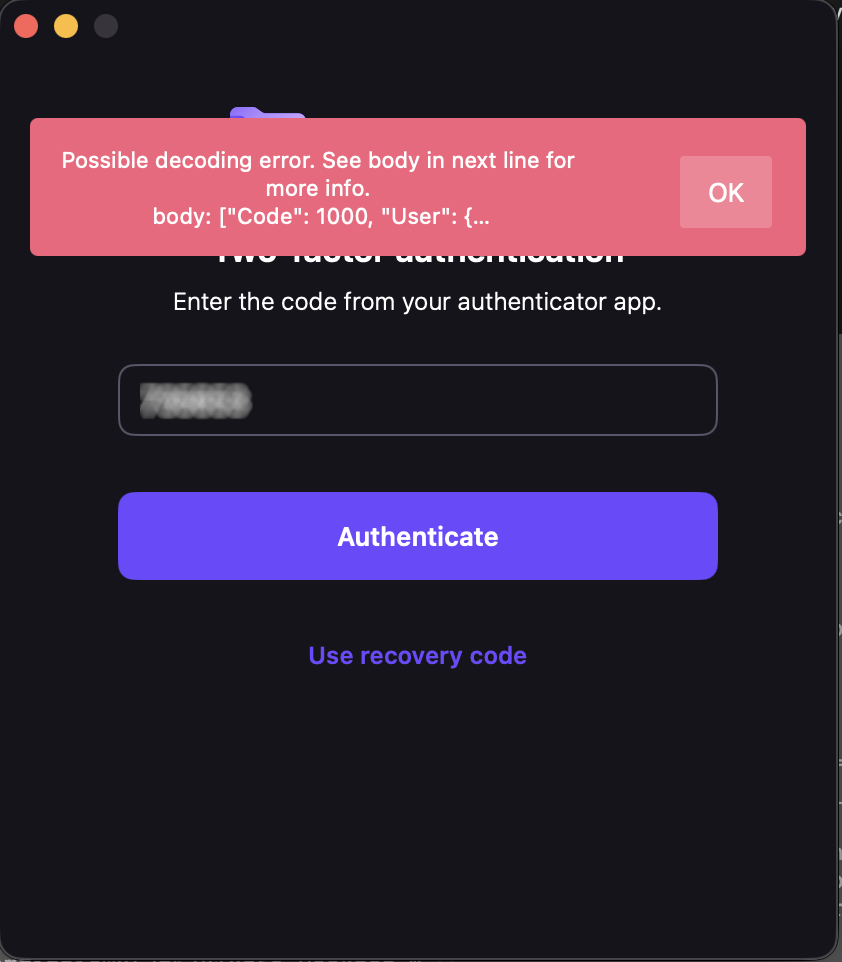
My credentials worked fine in the browser. Proton Mail desktop worked. ProtonVPN worked. Just Drive was broken.
I contacted Proton support and, to their credit, they responded quickly with a cleanup script — a bash script that nukes every Proton Drive file, preference, container, and cache from your system. I ran it. Reinstalled. Same error. I found download links for older versions of the app and tried those too. Same error. I updated macOS from 26.3.1 to 26.4. Same error. I even verified my system clock wasn’t drifting (TOTP codes are time-sensitive) — it was accurate to 8 milliseconds.
At this point I knew two things: the problem was server-side, and support was going to take a while to escalate it. I had another Mac where Drive was still working, but I wasn’t about to sign out and back in on that machine — if the login flow itself was broken, I’d lose access on both.
So I did something that wouldn’t have been possible a few years ago. I asked an AI to help me read the source code.
Open source changes the equation
Proton publishes the source code for their iOS and macOS apps on GitHub. The core networking and authentication library — protoncore_ios — is fully open. This is the code that handles login, token management, API calls, and JSON decoding. The exact code running on my machine was available for anyone to read.
But “available to read” and “practical to read” are very different things. protoncore_ios alone has 44 libraries. The mac-drive repo has another dozen modules. The authentication flow spans multiple files across multiple packages — LoginService, AuthHelper, Session, ProtonMailAPIService, endpoint definitions, credential managers. Tracing a single error message through that stack by hand would take a seasoned Swift developer hours, maybe a full day.
With AI, it took about twenty minutes.
The investigation
I cloned three repos — mac-drive, ios-drive, and protoncore_ios — and pointed the AI at them. I said: find where “Possible decoding error” comes from and trace backward to figure out what’s failing.
It started at the error string in Session.swift line 66 and worked outward. Within minutes it had mapped the full post-login flow: TOTP succeeds → handleValidCredentials() → getUserInfo() calls GET /users → response comes back → decoding fails → error surfaces as “Possible decoding error.”
The first theory was a scope/permissions issue — the network logs showed a 401 after successful authentication, which looked like the session token was being rejected. The AI traced the entire retry and token-refresh logic across three files, mapping out exactly how the app handles 401s, refreshes credentials, and retries. That analysis was thorough and correct, but it turned out to be a red herring.
The breakthrough came when I checked the app’s own log file buried in ~/Library/Containers/ch.protonmail.drive/Data/Library/logs.txt. The protoncore networking layer had dumped the full server response into the error message. And there it was:
"Code": 1000
Code 1000 means success. The server had returned a perfectly valid, complete User object. The HTTP request wasn’t failing — the JSON decoding was failing. The error message was, for once, exactly right.
The AI immediately zeroed in on the Flags field in the response:
"Flags": {
    "sso": 0,
    "has-a-byoe-address": 0,
    "has-temporary-password": 0
}
And then looked at the Swift struct that’s supposed to decode it:
public struct UserFlags: Codable, Equatable {
    public let hasBYOEAddress: Bool?
    public let hasTemporaryPassword: Bool?
    public let sso: Bool?
}
The server was sending 0 and 1 — integers. The client expected true and false — booleans. Swift’s Codable protocol does not silently convert between the two. When the decoder hit "sso": 0 and expected a Bool, it threw a DecodingError.typeMismatch, which cascaded up and killed the entire login flow.
That’s it. That was the whole bug. Someone on the server side had changed the Flags response format from booleans to integers, and the Swift client couldn’t parse it.
The fix
Once you know the problem, the fix is almost trivial. A custom decoder on UserFlags that tries Bool first, falls back to Int:
public init(from decoder: Decoder) throws {
    let container = try decoder.container(keyedBy: CodingKeys.self)
    hasBYOEAddress = Self.decodeBool(from: container, key: .hasBYOEAddress)
    hasTemporaryPassword = Self.decodeBool(from: container, key: .hasTemporaryPassword)
    sso = Self.decodeBool(from: container, key: .sso)
}

private static func decodeBool(
    from container: KeyedDecodingContainer<CodingKeys>, key: CodingKeys
) -> Bool? {
    if let value = try? container.decodeIfPresent(Bool.self, forKey: key) {
        return value
    }
    if let intValue = try? container.decodeIfPresent(Int.self, forKey: key) {
        return intValue != 0
    }
    return nil
}
Twenty-three lines. Backward-compatible — if the server goes back to sending booleans, it still works. I committed it, verified it compiled against the ProtonCoreDataModel scheme, generated a patch, and wrote up a GitHub issue with the full root cause analysis.
I also confirmed the bug was present on the develop branch and the latest tag (33.5.1). Nobody had caught it yet.
The punchline
I sent my findings to Proton — the analysis, the patch, the GitHub issue draft. Almost simultaneously, they replied saying they’d found and fixed the problem on their end. They didn’t ship a new client (understandably — spinning a new macOS release is a whole production). Instead, they fixed it server-side. Someone had a conversation with whoever introduced the regression, and the API went back to returning proper booleans.
I can confirm this: the app’s log file on my machine no longer contains any decoding errors or Flags dumps. The login just works now. The server-side fix landed silently, no client update required.
What this is actually about
This isn’t really a story about a type mismatch in a JSON response. It’s about how the relationship between software companies and their users is changing.
Five years ago, if a desktop app broke on login, your options were: contact support, wait, maybe get a workaround, probably wait some more. You were a passive recipient of someone else’s debugging process. The app was a black box. You could describe symptoms, but you couldn’t diagnose.
Today, three things have changed:
Open source makes the code readable. Proton publishes their client source. That’s not just a trust signal — it’s a diagnostic tool. When something breaks, the answer is in the code, available to anyone.
With a caveat. The version of mac-drive I was running (2.10.3) wasn’t published yet — the latest open-source release was 2.10.2. The core library pinned by that release (protoncore_ios 33.2.0) was available and version-matched, which is where the bug lived, so I got lucky. But if the bug had been in the Drive app layer rather than the shared library, I’d have been debugging against stale code. This is a call to action for every company shipping open-source software: if you’re going to open your source, keep it current. A repo that’s two releases behind your shipping binary isn’t really open — it’s a museum exhibit. The whole point of open source as a diagnostic tool breaks down when the code you can read doesn’t match the code that’s running.
AI makes the code understandable. Having access to 44 libraries of Swift code is meaningless if you can’t navigate it. AI can trace an error string through a multi-package call stack, map authentication flows across files, identify type mismatches between server responses and client models, and do it in minutes instead of hours. You don’t need to be a Swift expert. You don’t even need to be a developer. You need to be able to describe what’s wrong and point at the code.
The combination creates a new kind of consumer. Not a passive bug reporter who says “it’s broken, please fix it.” A participant who can say “here’s the exact file, line, and type mismatch causing the failure, here’s a patch, and here’s a ready-to-post issue.” That’s a fundamentally different interaction with a support team.
I want to be clear: Proton’s team found the problem independently and fixed it fast. I’m not claiming I beat them to it. The point is that I could have. A regular user, with no access to Proton’s internal systems, no Swift expertise, and no knowledge of the codebase going in, was able to produce a complete root cause analysis and working patch for a production bug in an afternoon. The AI did the heavy lifting of code navigation and pattern matching. I provided the context — the symptoms, the log files, the intuition about what to check next.
That’s new. And it’s going to keep getting more common.
The broader lesson
If you’re a software company shipping open-source clients: your users are about to get a lot more capable. Bug reports are going to come in with patches attached. Root cause analyses are going to arrive before your own team finishes triaging. This is a good thing — embrace it.
If you’re a user hitting a wall with a broken app: check if the source is open. Clone it. Point an AI at it. You might be surprised how far you get.
And if you’re the person who changed a server API to return 0 instead of false without checking the client contracts — well, I hope the talking-to was gentle. We’ve all been there.
Tools used: Kiro CLI (AI assistant), Xcode 26.4, three open-source Proton repos, one very thorough cleanup script, and a lot of stubbornness.
The GitHub issue: ProtonMail/protoncore_ios#12
 Hype Cycles